
Microsoft Administering Windows Server - AZ-802무료 덤프문제 풀어보기
You have a Hyper-V host named HV1 that contains a virtual machine named VM1.
You need to perform host-based file copying between HV1 and VM1 while VM1 is disconnected from the network.
How should you complete the PowerShell command?
To answer, select the appropriate options in the answer area.
NOTE: Each correct selection is worth one point.
Answer Area:

You need to perform host-based file copying between HV1 and VM1 while VM1 is disconnected from the network.
How should you complete the PowerShell command?
To answer, select the appropriate options in the answer area.
NOTE: Each correct selection is worth one point.
Answer Area:
정답:

Explanation:
First selection: Enable-VMIntegrationService
Second selection: " Guest Service Interface "
Completed command:
Enable-VMIntegrationService -VMName " VM1 " -Name " Guest Service Interface " Hyper-V Integration Services provide communication mechanisms between a Hyper-V host and its guest virtual machines.
The Guest Service Interface integration service supports copying files from the host into the guest without requiring conventional network connectivity.
This functionality is useful when a virtual machine is isolated from the network or has network configuration problems.
The Enable-VMIntegrationService cmdlet activates an integration service for a selected virtual machine.
Specifying Guest Service Interface enables file-copy functionality, which administrators can subsequently use through the Copy-VMFile cmdlet.
Heartbeat monitors guest responsiveness. Key-Value Pair Exchange exchanges configuration information between host and guest, while Volume Shadow Copy Service integration supports backup consistency.
Therefore, Enable-VMIntegrationService with Guest Service Interface is the correct configuration.
Your on-premises network contains an Active Directory Domain Services (AD DS) domain. The domain contains five servers that run Windows Server. The network also contains two workgroup servers that run Windows Server. You need to implement a connection security rule between the member servers and the workgroup servers. Which authentication method should you use?
정답: A
설명: (Fast2test 회원만 볼 수 있음)
You have a server named Server1 that runs Windows Server and contains two volumes named C and D.
You connect a disk to Server 1 that is encrypted by using BitLocker and contains a volume named E.
You need to ensure that after a restart, the data on volume E can be accessed without providing a password or a recovery key.
Which three actions should you perform on Server1 in sequence? To answer, move the appropriate actions from the list of actions to the answer area and arrange them in the correct order.

You connect a disk to Server 1 that is encrypted by using BitLocker and contains a volume named E.
You need to ensure that after a restart, the data on volume E can be accessed without providing a password or a recovery key.
Which three actions should you perform on Server1 in sequence? To answer, move the appropriate actions from the list of actions to the answer area and arrange them in the correct order.
정답:

Explanation:
1. Install the BitLocker Drive Encryption feature. 2. Encrypt volume C. 3. Turn on auto-unlock.
Automatic unlocking of a BitLocker-protected fixed data drive is a feature of the core BitLocker Drive Encryption feature (Enable-BitLockerAutoUnlock) and has one hard prerequisite: the operating system volume on that computer must also be protected by BitLocker, because the auto-unlock key for the data volume is itself secured against the encrypted OS volume. Since Server1 ' s OS volume (C) is not stated to be encrypted, it must be encrypted first. BitLocker Network Unlock is an unrelated feature that unlocks operating system volumes over the network during startup in a WDS/DHCP environment - it plays no role in unlocking a fixed data drive and is not a prerequisite for Enable-BitLockerAutoUnlock. The correct sequence is therefore to add the BitLocker Drive Encryption feature, encrypt the OS volume (C), and then turn on auto- unlock for volume E, after which subsequent restarts will mount and unlock volume E automatically without any password or recovery key prompt.
You have a Windows Server Failover Cluster (WSFC) that contains four nodes. You need to configure the cluster to host a new file share for Hyper-V virtual machines. The solution must provide highly available, active-active SMB access to the share. Which cmdlet should you run?
정답: D
설명: (Fast2test 회원만 볼 수 있음)
Your network contains an Active Directory Domain Services (AD DS) domain named.
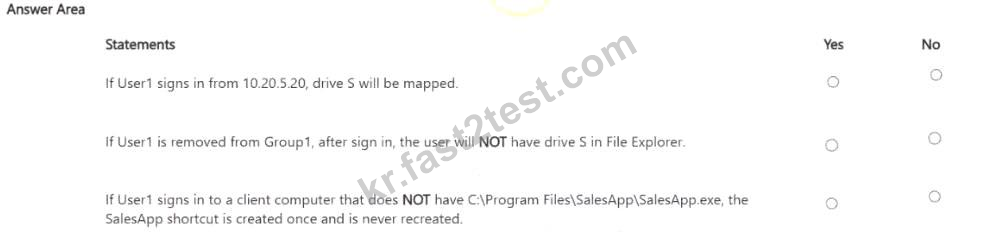
The domain contains a user named User1 and two global security groups named Group! and Group2. User1 is a member of both groups.
A Group Policy Object (GPO) named GP01 is linked to the domain. GP01 contains the following User Configuration preference items.

For each of the following statements, select Yes if the statement is true. Otherwise, select No.
NOTE: Each correct selection is worth one point.
The domain contains a user named User1 and two global security groups named Group! and Group2. User1 is a member of both groups.
A Group Policy Object (GPO) named GP01 is linked to the domain. GP01 contains the following User Configuration preference items.
For each of the following statements, select Yes if the statement is true. Otherwise, select No.
NOTE: Each correct selection is worth one point.
정답:

Explanation:
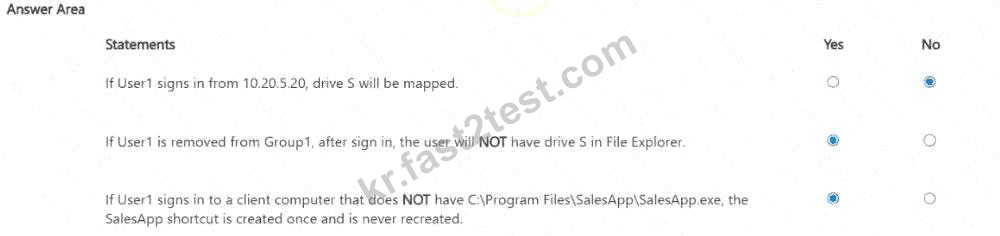
Statement 1: No. Statement 2: Yes. Statement 3: Yes.
The Drive Maps item targets Group1 AND an IP address range of 10.10.0.0 through 10.10.255.255, and both conditions of an AND-joined target must be true for the item to apply; 10.20.5.20 falls outside that 10.10.0.0-
10.10.255.255 range, so the IP condition fails regardless of Group1 membership, and drive S is not mapped, making statement 1 false. The same Drive Maps item has Remove this item when it is no longer applied selected, meaning that whenever the item ' s targeting later evaluates to false for a user who previously received the mapping, the client-side extension actively removes the previously applied drive mapping on the next Group Policy refresh; removing User1 from Group1 breaks the AND condition (Group1 AND IP range) going forward, so on the next sign-in the item ' s targeting fails and the drive mapping is removed, meaning the user will NOT have drive S, making statement 2 true. The Shortcuts item targets Group2 OR the local file
' s existence, and since User1 remains a member of Group2 regardless of the local file ' s presence, the OR condition is satisfied purely by group membership even on a computer lacking the local file, so the shortcut is applied; because Apply once and do not reapply is selected for Shortcuts, the client-side extension creates it a single time and then never re-evaluates or recreates it again on that computer, even across later sign-ins or policy refreshes, making statement 3 true.
Your network contains an Active Directory Domain Services (AD DS) domain. The domain contains servers that run Windows Server as shown in the following table.
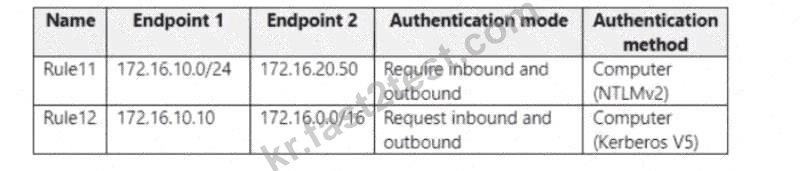
Server1 has the connection security rules shown in the following table.
Server2 has the connection security rules shown in the following table.
.

Exhibit
Exhibit

Server1 has the connection security rules shown in the following table.
Server2 has the connection security rules shown in the following table.
.
Exhibit
Exhibit
정답:

Explanation:
Server1 can communicate with Server2 successfully: Yes. Server2 can communicate with Server3 successfully: Yes. Server3 can communicate with Server2 successfully: Yes.
A connection security rule set to Require authentication blocks the connection outright if authentication cannot be completed, whereas a rule set to Request authentication always lets the connection proceed even when authentication fails, since it only attempts protection and never enforces it. Rule11 on Server1 requires computer authentication using NTLMv2 specifically for traffic between its own /24 subnet and Server2 ' s address, and this communication succeeds because Server2 is configured with a matching, compatible authentication rule for that exact traffic pattern, so Server1 and Server2 can both authenticate successfully.
Traffic between Server2 and Server3 instead falls under Server1 ' s and Server2 ' s broader Rule12, which covers the wider 172.16.0.0/16 range in Request mode rather than the narrow Require-mode Rule11. Because connection security rules never block traffic on their own -- a separate Windows Defender Firewall rule is what actually permits or blocks a connection -- and Request mode tolerates a peer that cannot or does not authenticate at all, communication between Server2 and Server3 succeeds in both directions even though Server3 has no connection security rule of its own configured to match against.
You are planning the deployment of Microsoft Sentinel. Which type of Microsoft Sentinel data connector should you use to meet the security requirements?
정답: C
설명: (Fast2test 회원만 볼 수 있음)
You have an Azure subscription. The subscription contains a virtual machine named VM1 that runs Windows Server. You plan to manage VM1 by using a PowerShell runbook. You need to create the runbook. What should you create first?
정답: C
설명: (Fast2test 회원만 볼 수 있음)
You have a server named Server1 that runs Windows Server.
For Server1, you enable the default App Control for Business policies in audit mode.
You need to ensure that specific third-party applications installed on Server1 are allowed to run by using App Control for Business.
Which four actions should you perform in sequence? To answer, move the appropriate actions from the list of actions to the answer area and arrange them in the correct order.

For Server1, you enable the default App Control for Business policies in audit mode.
You need to ensure that specific third-party applications installed on Server1 are allowed to run by using App Control for Business.
Which four actions should you perform in sequence? To answer, move the appropriate actions from the list of actions to the answer area and arrange them in the correct order.
정답:

Explanation:
On Windows Server, App Control for Business policies are now managed through OSConfig: you build the rule set for the specific third-party applications with New-CIPolicy and New-CIPolicyRule, use the App Control Policy Wizard to assemble and export those rules into a supplemental policy XML file, finish preparing that file for deployment by setting its version and policy identifier with Set-CIPolicyVersion and Set-CIPolicyIdInfo (including marking it as a supplement to the running audit-mode base policy), and finally push it into effect with Set-OSConfigDesiredConfiguration -Scenario AppControl. This lets the previously audited third- party applications run under the enforced policy without having to author an entirely new base policy, and generating an EVTX file from Event Viewer or running Enable-OSConfigDriftControl are unrelated actions that play no part in authoring or deploying this supplemental allow policy. Building the rules from New-CIPolicyRule can itself be driven from the audit-mode EVTX data to capture exactly the executables the third-party applications actually use, but that consumption of the audit log happens inside the New-CIPolicy/New-CIPolicyRule step rather than as a separate action in this four-step sequence.
Your network contains an Active Directory Domain Services (AD DS) domain. The domain contains the servers shown in the following table: Server1 (Has Windows Admin Center installed), Server2 (Has the DHCP Server role installed). You need to ensure that from Server1, you can use Windows Admin Center to manage the DHCP Server role on Server2. What should you do first?

Server role table
Server role table
정답: B
설명: (Fast2test 회원만 볼 수 있음)
Your network contains an Active Directory Domain Services (AD DS) domain. The domain contains two servers named Server1 and Server2 that run Windows Server You need to use connection security rules to control the connections between Server1 and Server2. The solution must meet the following requirements:
* IPsec protection for Server1 and Server2 must be limited.
* Traffic between Server1 and Server2 must be authenticated and encrypted.
* Server2 must accept traffic from Server1 only if Server2 is authenticated by using IPsec.
How should you configure the connection security rules? To answer, select the appropriate options in the answe1 area.
NOTE: Each correct selection is worth one point

* IPsec protection for Server1 and Server2 must be limited.
* Traffic between Server1 and Server2 must be authenticated and encrypted.
* Server2 must accept traffic from Server1 only if Server2 is authenticated by using IPsec.
How should you configure the connection security rules? To answer, select the appropriate options in the answe1 area.
NOTE: Each correct selection is worth one point
정답:
Explanation:

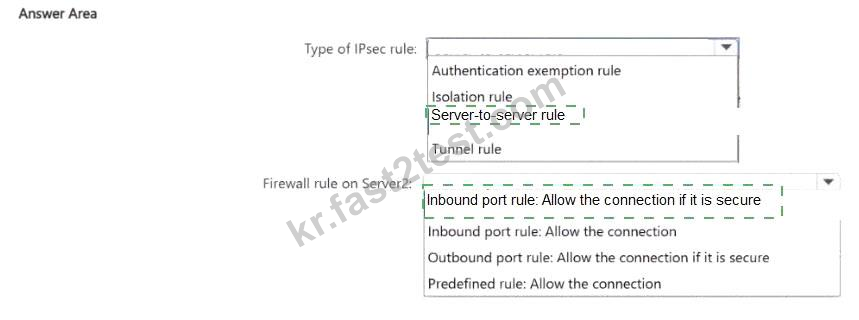
Type of IPsec rule: Server-to-server rule. Firewall rule on Server2: Inbound port rule: Allow the connection if it is secure.
A server-to-server connection security rule protects traffic exchanged between two specific, explicitly defined endpoints, which is exactly the ' limited ' scope required here, since it applies only between Server1 and Server2 rather than isolating an entire domain or zone of the network the way an isolation rule would (isolation rules are built for domain- or network-wide policies restricting communication to only domain- joined or otherwise trusted computers, a much broader scope than two named servers). An authentication exemption rule only carves out exceptions from IPsec requirements for specified traffic or hosts and would not itself provide the authenticated, encrypted protection the scenario requires; a tunnel rule protects traffic between two gateway computers on behalf of other hosts behind them, which does not match a direct server- to-server relationship. Once the server-to-server connection security rule is defined to require authentication and encryption for traffic between the two servers, Server2 additionally needs an inbound firewall rule of type
' Allow the connection if it is secure, ' which permits inbound traffic from Server1 only when it arrives already authenticated and protected by the negotiated IPsec security association; a plain ' Allow the connection ' rule would accept the traffic regardless of whether it was secured, and outbound or predefined rule types do not enforce the requirement that Server2 accept Server1 ' s traffic only when it is IPsec- authenticated.