
Microsoft Enterprise Voice & Online Services with Microsoft Lync Server 2013 (070-337日本語版) - 070-337日本語무료 덤프문제 풀어보기
Select and Place:

정답:

Explanation:
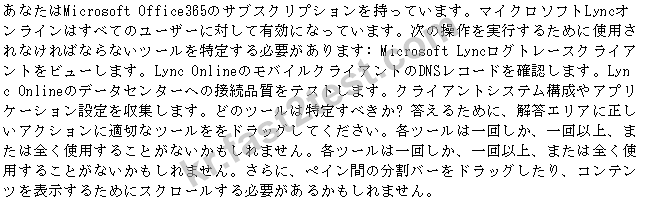
Box 1: Snooper utility Box 2: Microsoft Office Communications Server Remote Connectivity Analyzer Box 3: Office 365 Lync Online Transport Reliability IP Prope (TRIPP) tool Box 4: Microsoft Online Service Diagnostics and Logging (MOSDAL) Support Toolkit
Lync Online - Transport Reliability IP Probe (TRIPP Tool) This reliability tool tests your Internet connection to a Microsoft Lync Online Service data center and measures the response times, bandwidth, allowed ports, route taken, and overall connection quality with respect to Real Time Media. The results can help you evaluate your network configuration for potential use with the Microsoft Lync Online Service. This tool does not engage any of the offerings from Microsoft Lync Online Service.
Microsoft Office Communications Server Remote Connectivity Analyzer The Office Communications Server Remote Connectivity Analyzer is a great tool for performing testing, troubleshooting, and diagnostics on Communications Server 2007 and Communications Server 2007 R2 deployments, and should server as your initial stop when attempting to troubleshoot a Communications Server Edge Server connectivity issue. The Office Communications Server Remote Connectivity Analyzer is a web site that Communications Server administrators can use to validate and diagnose end-to-end Communications Server scenarios. The site simulates multiple Office Communications Server client access scenarios from outside the customer's infrastructure and reports whether the test was successful. If the test fails, the tool informs you exactly where in the process the test failed, as well as provides troubleshooting tips about resolving the issue.
The Microsoft Online Services Diagnostics and Logging (MOSDAL) Support Toolkit performs network diagnostics and collects system configuration, network configuration, and logging information for applications that are used to connect to Microsoft Business Productivity Online Standard Suite (BPOSS) or to Microsoft Office 365. The logs and diagnostic information that the tool generates provide data that helps technical support professionals troubleshoot configuration, network, installation, and other service-related issues. The MOSDAL Support Toolkit collects log files, registry keys, and configuration settings that would otherwise require time-consuming and labor-intensive collection by using separate tools.
Hot Area:

정답:

Explanation:
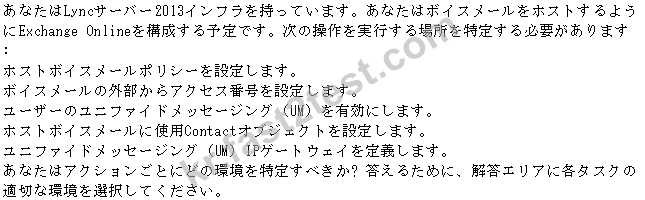
http://technet.microsoft.com/en-us/library/gg398932.aspx
Lync Server 2010 on-premises supports interoperability with Exchange Online in the following ways:
Calendar data and Out of Office messages
Instant Messaging (IM) and presence interoperability in Outlook Web App
Voice mail interoperability
정답: C
설명: (Fast2test 회원만 볼 수 있음)
Hot Area:

정답:

Explanation:
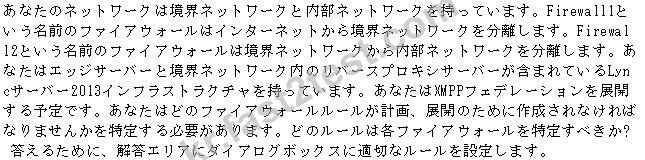
http://technet.microsoft.com/en-us/library/gg425891.aspx http://technet.microsoft.com/en-us/library/jj618373.aspx
If you plan to support the extensible messaging and presence protocol (XMPP) for your deployment, select the Enable XMPP federation (port 5269) check box (for the external edge server interface).
The number 5269 and 23456 that is passed to findstr as a parameter instructs findstr to search the output of netstat for the strings 5269 and 23456. If XMPP is correctly configured, the result of the commands should result in listening and established connections, both on the external (port 5269) and the internal (port 23456) interfaces of the Edge Server.
Reference: Setting Up XMPP Federation

Select and Place:

정답:

Explanation:
Note:
Lyncgate2 (Geneva) for calls to Europe
Lyncgate1 (Montreal) for calls to North America
For the best disaster recovery abilities in Lync Server 2013, deploy pairs of Front End pools across two geographically dispersed sites. Each site contains a Front End pool which is paired with a corresponding Front End pool in the other site. Both sites are active, and the Lync Server Backup Service provides real-time data replication to keep the pools synchronized. The Backup Service is a new feature in Lync Server 2013, designed to support the disaster recovery solution. It is installed on a Front End pool when you pair the pool with another Front End pool.
Hot Area:

정답:

Explanation:
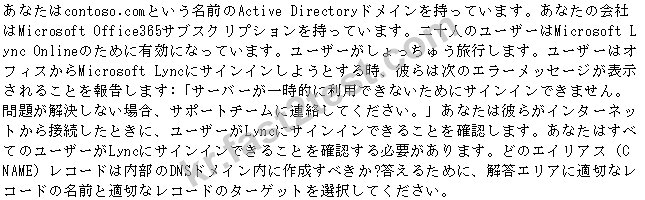
Note: The FQDN must be the primary on the cert or be a SAN entry for the cert. Usually, the FQDN would be sip.mydomain.com. Create a SRV record for sip to point to the real FQDN of the host.
The Lync 2013 Preview client can be set to use manual configuration to check whether the sign in issue is related to DNS resolution issues. If manual configuration works and automatic configuration doesn't work, it usually indicates a problem with DNS resolution. This usually occurs because the DNS SRV records aren't present or are inaccessible from the client computer. To set Lync 2013 Preview to use manual configuration, follow these steps:
In the upper-right area of Lync 2013 Preview, click the Gear icon to open the Options page.
In the Lync - Options dialog box, click Personal.
Next to the sign-in address, click Advanced.
Make sure that Manual Configuration is selected and that the configuration values are exactly as follows:
Internal server name or IP address: sipdir.online.lync.com:443
External server name or IP address: sipdir.online.lync.com:443