
Citrix Deploying Citrix XenDesktop 7.6 Solutions - 1Y0-301무료 덤프문제 풀어보기
What does a Citrix Engineer need to do to encrypt all communications to and from virtual desktops?
정답: C
A Citrix Engineer could use __________ to enable high availability for XenDesktop site databases. (Choose the correct
option to complete the sentence.)
option to complete the sentence.)
정답: D
Scenario: The current XenServer pool master needs to be retired. A Citrix Engineer is preparing to transfer the pool
master role to another host.
Which command should the engineer run to transition the pool master role to a different host in the resource pool
that is in a running state?
master role to another host.
Which command should the engineer run to transition the pool master role to a different host in the resource pool
that is in a running state?
정답: B
How should a Citrix Engineer configure a hosted application so that only a subset of users within an existing Delivery
Group are able to access the hosted application?
Group are able to access the hosted application?
정답: A
Which two other database server permissions are required in a Provisioning Services farm in addition to 'execute
permissions on the stored procedures'? (Choose two.)
permissions on the stored procedures'? (Choose two.)
정답: A,B
Scenario: After using evaluation licensing to explore XenDesktop, a Citrix Engineer installs valid Enterprise licenses on
the Citrix License Server. The engineer confirms that the licenses show correctly in the license console. A few weeks
later, users in the environment report that they are receiving an error message when logging into Desktop OS
machines that states the evaluation license is about to expire.
What should the engineer do to correct this issue?
the Citrix License Server. The engineer confirms that the licenses show correctly in the license console. A few weeks
later, users in the environment report that they are receiving an error message when logging into Desktop OS
machines that states the evaluation license is about to expire.
What should the engineer do to correct this issue?
정답: A
SIMULATION
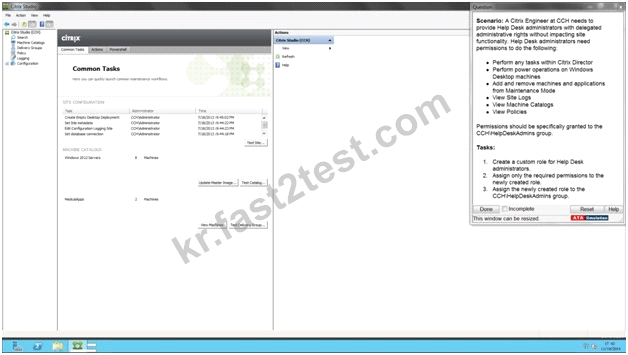
Scenario: A Citrix Engineer at CCH needs to provide Help Desk administrators with delegated administrative rights
without impacting site functionality.
Help Desk administrators need permissions to do the following:
Perform any tasks within Citrix Director
Perform power operations on Windows Desktop machines
Add and remove machines and applications from Maintenance Mode
View Site Logs
View Machine Catalogs
View Policies
Permissions should be specifically granted to the CCH\HelpDeskAdmins group. Tasks:
1. Create a custom role for Help Desk administrators.
2. Assign only the required permissions to the newly created role.
3. Assign the newly created role to the CCH\HelpDeskAdmins group.
Scenario: A Citrix Engineer at CCH needs to provide Help Desk administrators with delegated administrative rights
without impacting site functionality.
Help Desk administrators need permissions to do the following:
Perform any tasks within Citrix Director
Perform power operations on Windows Desktop machines
Add and remove machines and applications from Maintenance Mode
View Site Logs
View Machine Catalogs
View Policies
Permissions should be specifically granted to the CCH\HelpDeskAdmins group. Tasks:
1. Create a custom role for Help Desk administrators.
2. Assign only the required permissions to the newly created role.
3. Assign the newly created role to the CCH\HelpDeskAdmins group.
정답:
To create a custom role
In Studio, click Configuration > Administrators in the left pane, then click the Roles tab in the middle pane. A list of
existing roles appears.
In the Actions pane, click Create new Role.
Type a name and description for the role.
HelpDeskAdmins
For each object type that you want this role to have permissions for, select the object type, then select the
permissions.
Click Save.
To create a scope
In Studio, click Configuration > Administrators in the left pane, then click the Scopes tab in the middle pane. A list of
existing scopes appears.
In the Actions pane, click Create new Scope.
Type a name (for example, 'Sales') and a description (for example, 'Delivery Groups used by Sales') for the scope.
HelpDeskAdmins
Select object types or specific objects:
To select all objects of a particular type (for example, Delivery Groups), select the object type.
To select specific objects, expand the type, then select the individual objects (for example, individual Delivery Groups
used by the Sales team).
Click Save.
In Studio, click Configuration > Administrators in the left pane, then click the Roles tab in the middle pane. A list of
existing roles appears.
In the Actions pane, click Create new Role.
Type a name and description for the role.
HelpDeskAdmins
For each object type that you want this role to have permissions for, select the object type, then select the
permissions.
Click Save.
To create a scope
In Studio, click Configuration > Administrators in the left pane, then click the Scopes tab in the middle pane. A list of
existing scopes appears.
In the Actions pane, click Create new Scope.
Type a name (for example, 'Sales') and a description (for example, 'Delivery Groups used by Sales') for the scope.
HelpDeskAdmins
Select object types or specific objects:
To select all objects of a particular type (for example, Delivery Groups), select the object type.
To select specific objects, expand the type, then select the individual objects (for example, individual Delivery Groups
used by the Sales team).
Click Save.