
VMware Certified Advanced Professional 6 - Network Virtualization Deployment - 3V0-643무료 덤프문제 풀어보기
In the Dev environment, you have the application and database servers on separate networks created previously. Configure inbound only network security to allow only Dev application servers access to Dev database servers using MYSQL service port.
Requirements:
vCenter: vcsa-01a.corp.local
Credentials: [email protected] / VMware1!
Service Port: MYSQL
Networks: Dev-App-Tier-01-NEW and Dev-DB-Tier-01-NEW
Credentials for Dev VMs: root / VMware1!
This rule should be in its own "DB security-NEW" section.
Ensure inbound only network security allows Dev application servers access to Dev database servers.
This rule should not be prpogated to all NSX prepared clusters.
This rule should be created in a way that any new virtual machines on App and DB segments will be secured.
This rule should be created with the fewest rule(s) possible.
All other servers should be denied.
Ensure inbound security requirements are met.
HOL LAB for Practice:
See the explanation part for complete solution.
Requirements:
vCenter: vcsa-01a.corp.local
Credentials: [email protected] / VMware1!
Service Port: MYSQL
Networks: Dev-App-Tier-01-NEW and Dev-DB-Tier-01-NEW
Credentials for Dev VMs: root / VMware1!
This rule should be in its own "DB security-NEW" section.
Ensure inbound only network security allows Dev application servers access to Dev database servers.
This rule should not be prpogated to all NSX prepared clusters.
This rule should be created in a way that any new virtual machines on App and DB segments will be secured.
This rule should be created with the fewest rule(s) possible.
All other servers should be denied.
Ensure inbound security requirements are met.
HOL LAB for Practice:
See the explanation part for complete solution.
정답:
SOLUTION:
Firewall -> add new Section:



Add new Rule under newly created Section:

Edit Rule Name:
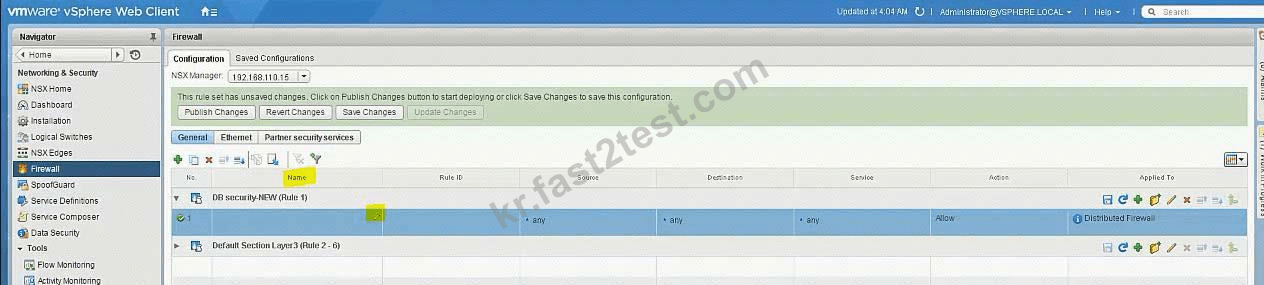

Source = Dev-App-Tier-01-NEW (LS)
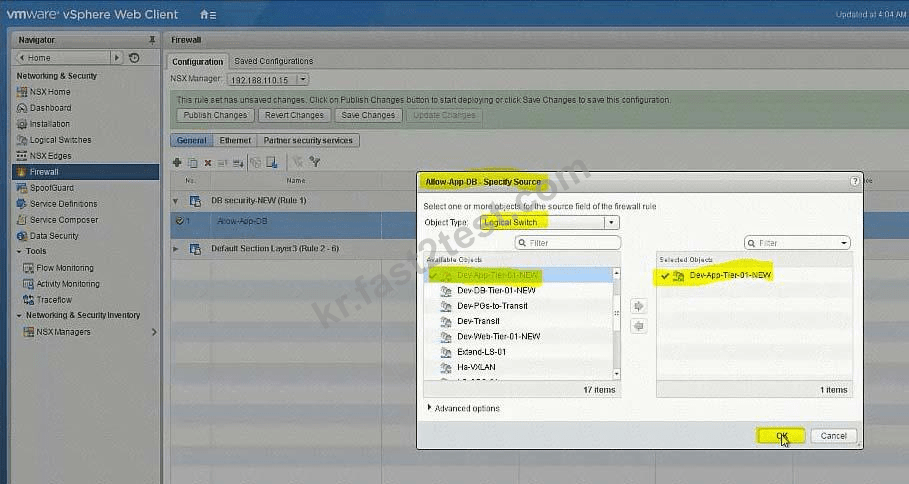
Destination = Dev-DB-Tier-01-NEW (LS)

Service = MySQL

Allow - In

Applied To: Logical Switch = Dev-DB-Tier-01-NEW

Add another rule = To Deny


Set destination: Logical Switch = Dev-DB-Tier-01-NEW
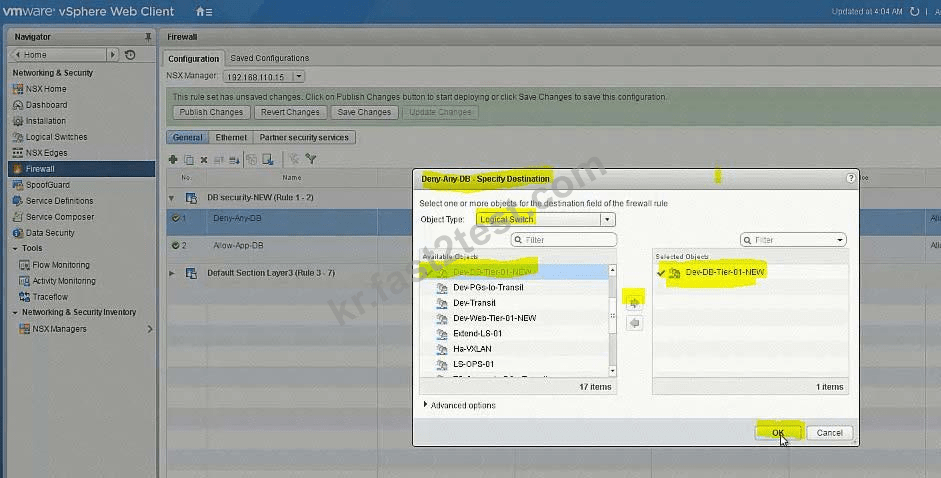

Bring to last the Deny rule:


Firewall -> add new Section:
Add new Rule under newly created Section:
Edit Rule Name:
Source = Dev-App-Tier-01-NEW (LS)
Destination = Dev-DB-Tier-01-NEW (LS)
Service = MySQL
Allow - In
Applied To: Logical Switch = Dev-DB-Tier-01-NEW
Add another rule = To Deny
Set destination: Logical Switch = Dev-DB-Tier-01-NEW
Bring to last the Deny rule:
The security team has requested that [email protected] have the ability to fully manage NSX Manager (192.168.210.15) for Site B.
Requirements:
vCenter: vcsa-01b.corp.local
Credentials: [email protected] / VMware1!
Ensure [email protected] has the ability to fully manage NSX Manager in SiteB.
NOTE:
You may have to log out of the web client and back in for 192.168.210.15 to show in web client.
HOL LAB for Practice:
See the explanation part for complete solution.
Requirements:
vCenter: vcsa-01b.corp.local
Credentials: [email protected] / VMware1!
Ensure [email protected] has the ability to fully manage NSX Manager in SiteB.
NOTE:
You may have to log out of the web client and back in for 192.168.210.15 to show in web client.
HOL LAB for Practice:
See the explanation part for complete solution.
정답:
SOLUTION:
NSX Manager in SiteB
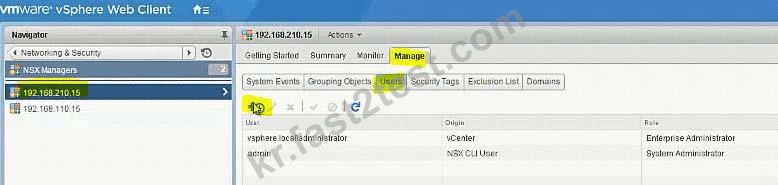
[email protected]
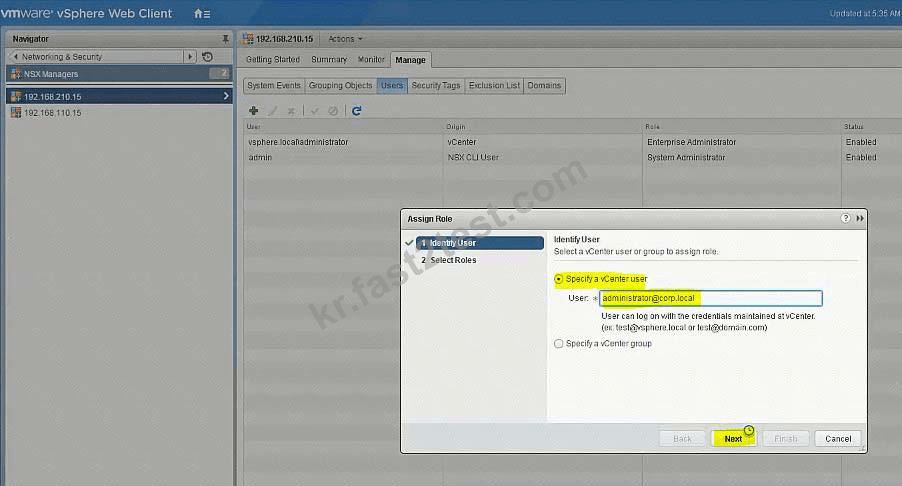
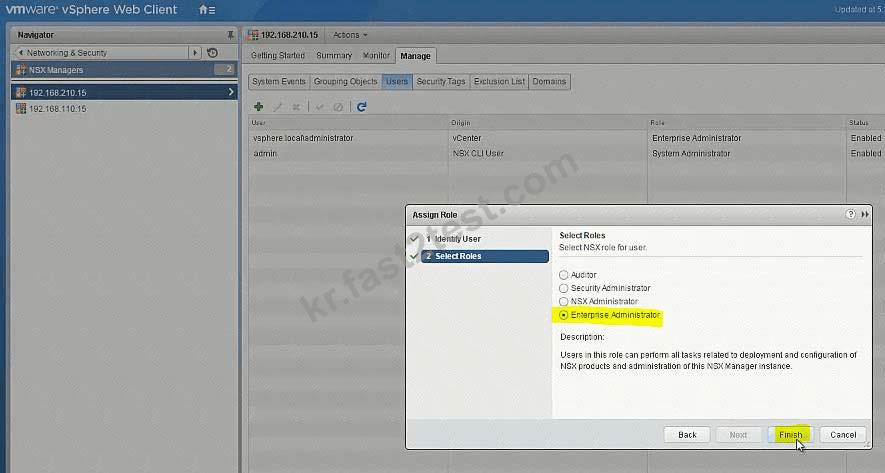
go to Nsx manager - b. select Manage Vcenter registration. check if lookup service is configured if not configured it will the details.
lookup service ip = Nsx Manager - a IP Address
Lookup service port = 7444
Lookup service= https://192.168.110.15:7444/lookupservice/sdk
SSO administrator = [email protected]
password = VMware1!
click on ok. click on yes.
NOTE: it will show u connected. if not connected. logout and login again
NSX Manager in SiteB
[email protected]
go to Nsx manager - b. select Manage Vcenter registration. check if lookup service is configured if not configured it will the details.
lookup service ip = Nsx Manager - a IP Address
Lookup service port = 7444
Lookup service= https://192.168.110.15:7444/lookupservice/sdk
SSO administrator = [email protected]
password = VMware1!
click on ok. click on yes.
NOTE: it will show u connected. if not connected. logout and login again
Configure the Layer 3 connectivity between the newly created Dev-segments by assigning them to a new DLR named Dev-DLR-NEW.
Requirements:
vCenter: vcsa-01a.corp.local
Ccredentials: [email protected] . VMware1!
Default GW for Dev-subnets:
Dev-Web-Tier-01-NEW172.16.10.1/24
Dev-App-Tier-01-NEW172.16.20.1/24
Dev-DB-Tier-01-NEW172.16.30.1/24
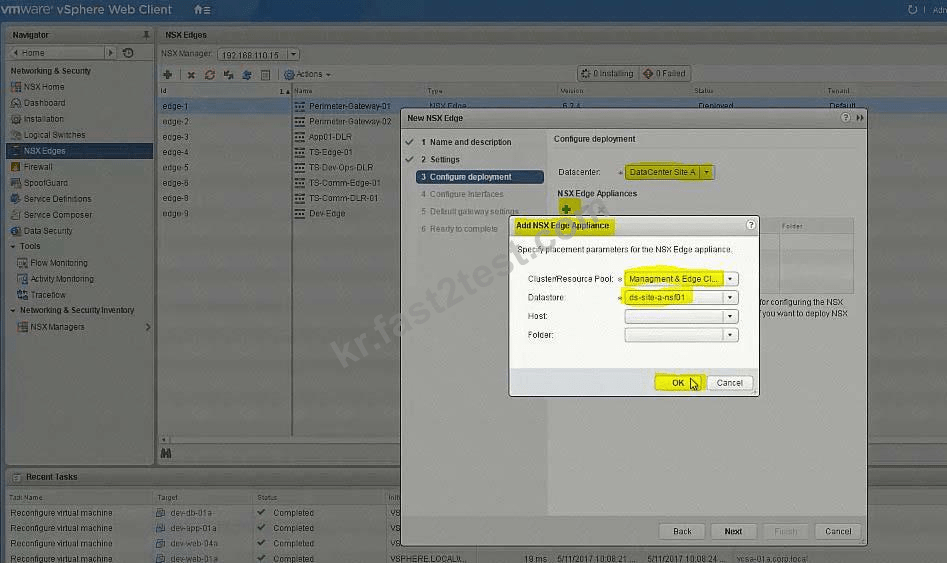
DLR Settings:
DLR Name: Dev-DLR-NEW
Uplink IP Address: 192.168.6.5/30
Interface: Dev-Transit
Password: VMware1!WMware1!
Cluster: Management & Edge Cluster
Ensure east-west routing has been optimized.
The control plane failover should begin 15 seconds on logical switch HA-VXLAN.
Ensure secure shell is available.
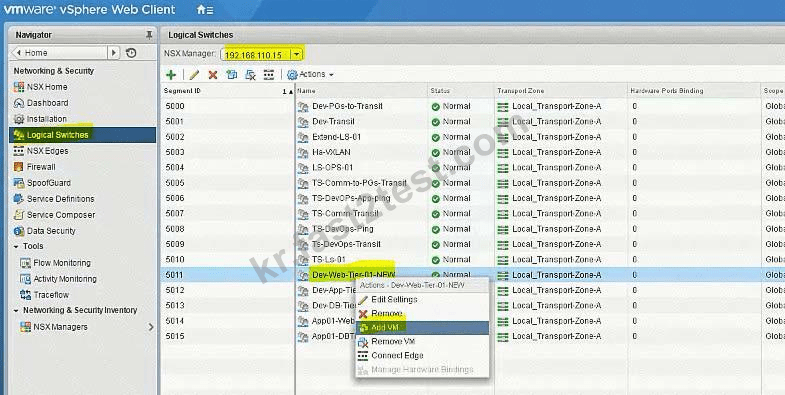
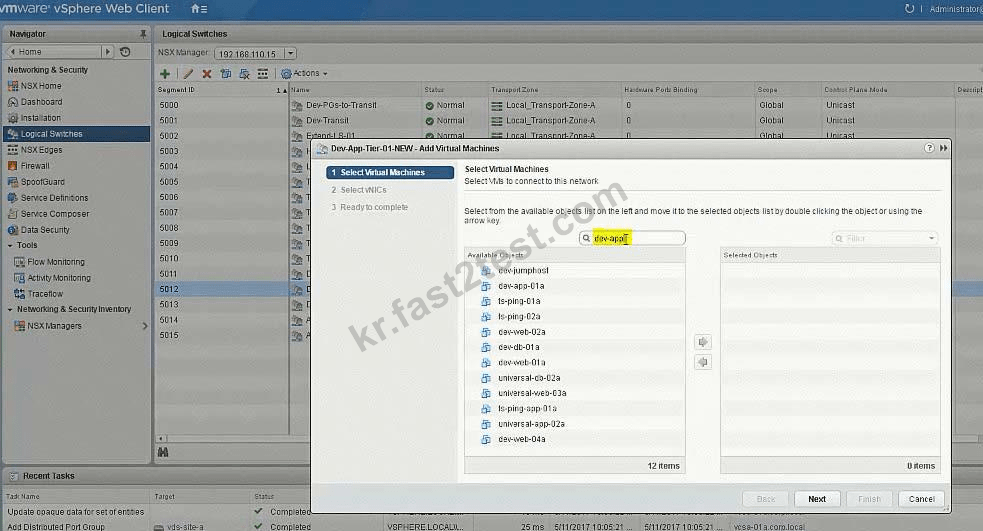
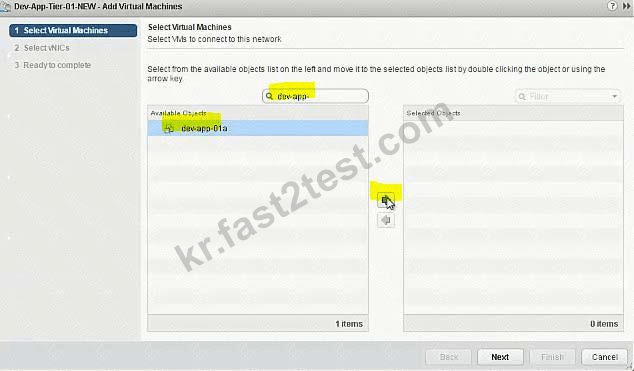
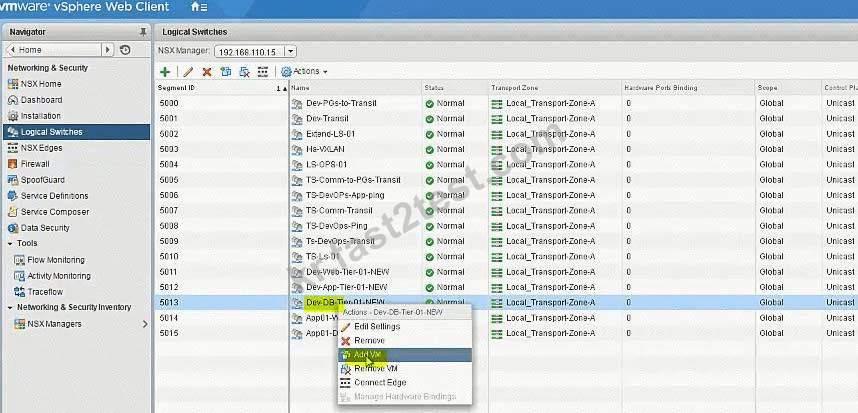
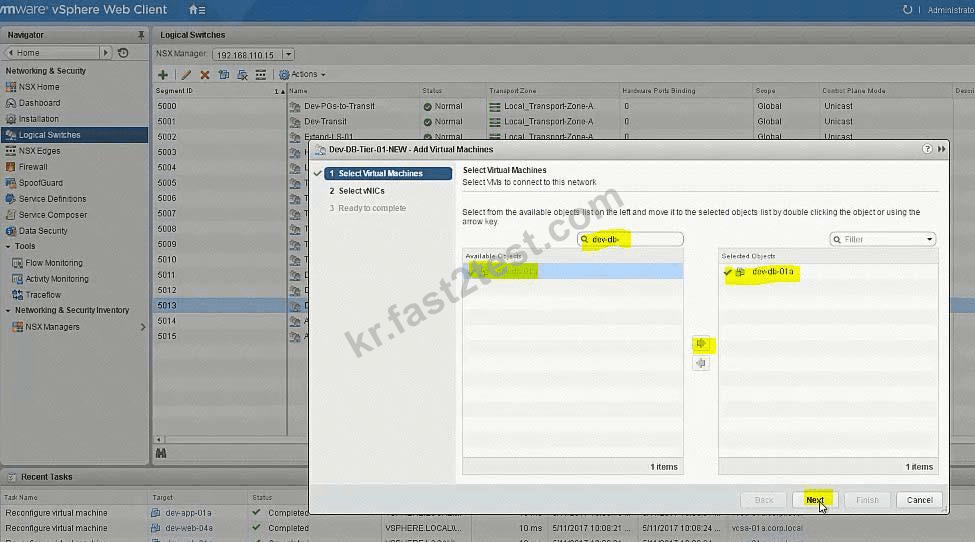
Connect the Web, App and DB virtual machines to their respective dev tiers.
Dev-web-01, Dev-web-02a, Dev-web-04a
Dev-app-01a
Dev-db-01a
HOL LAB for Practice:
also deploy Distributed logical router DLR in the same way the lab.
See the explanation part for complete solution.
Requirements:
vCenter: vcsa-01a.corp.local
Ccredentials: [email protected] . VMware1!
Default GW for Dev-subnets:
Dev-Web-Tier-01-NEW172.16.10.1/24
Dev-App-Tier-01-NEW172.16.20.1/24
Dev-DB-Tier-01-NEW172.16.30.1/24
DLR Settings:
DLR Name: Dev-DLR-NEW
Uplink IP Address: 192.168.6.5/30
Interface: Dev-Transit
Password: VMware1!WMware1!
Cluster: Management & Edge Cluster
Ensure east-west routing has been optimized.
The control plane failover should begin 15 seconds on logical switch HA-VXLAN.
Ensure secure shell is available.
Connect the Web, App and DB virtual machines to their respective dev tiers.
Dev-web-01, Dev-web-02a, Dev-web-04a
Dev-app-01a
Dev-db-01a
HOL LAB for Practice:
also deploy Distributed logical router DLR in the same way the lab.
See the explanation part for complete solution.
정답:
SOLUTION:
Add VMs to respective Logical Switches:





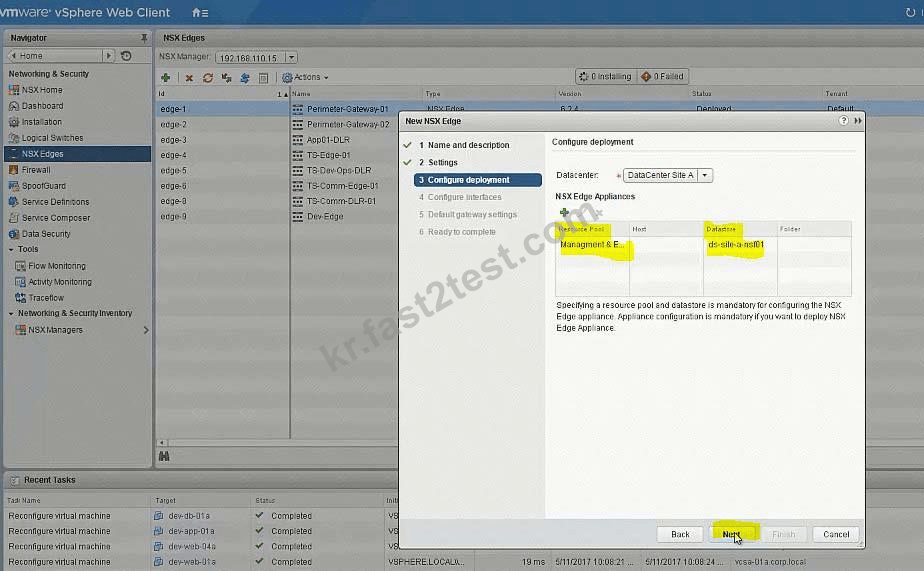


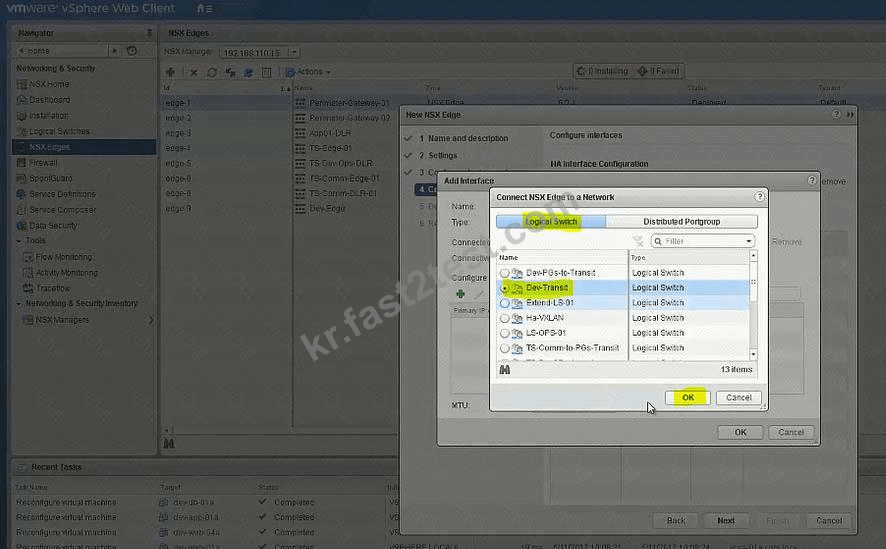

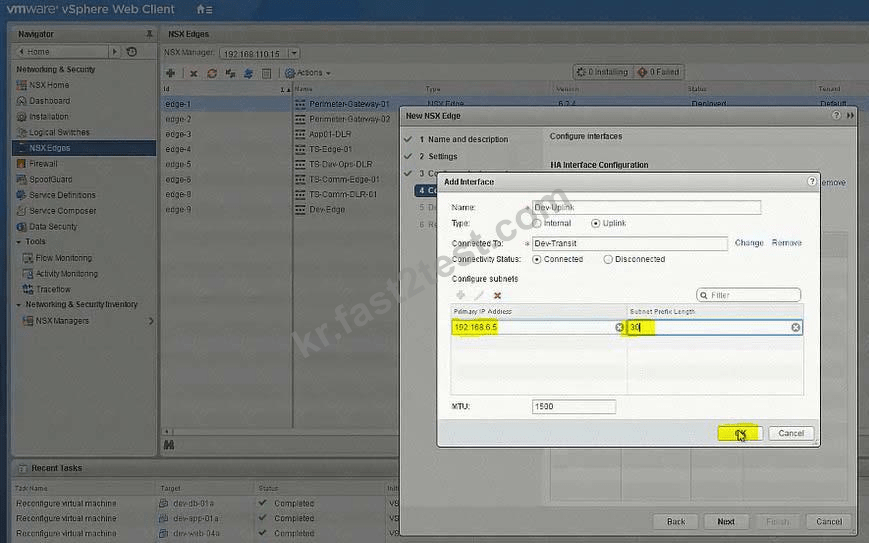
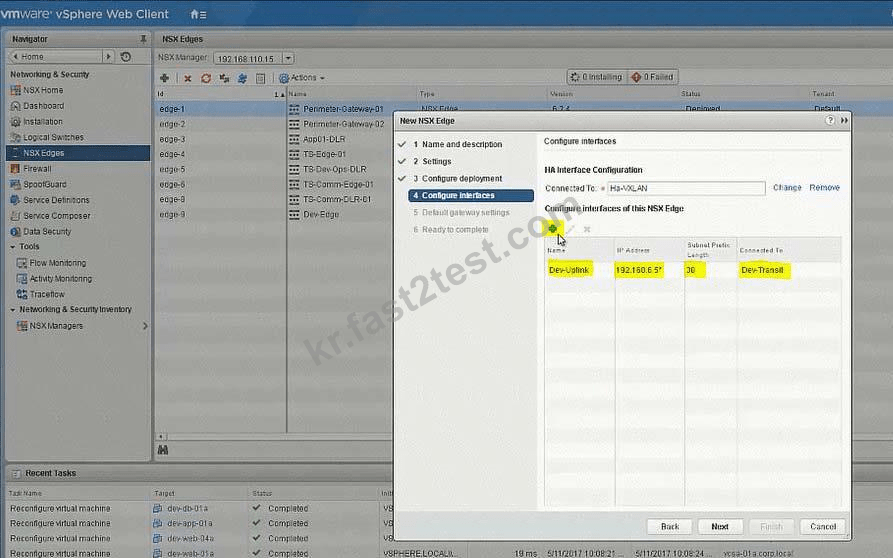


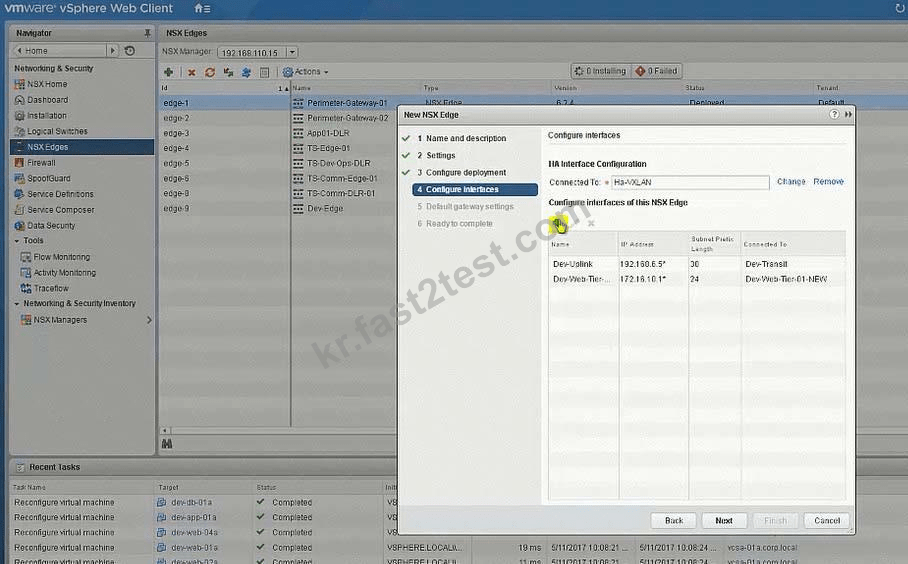


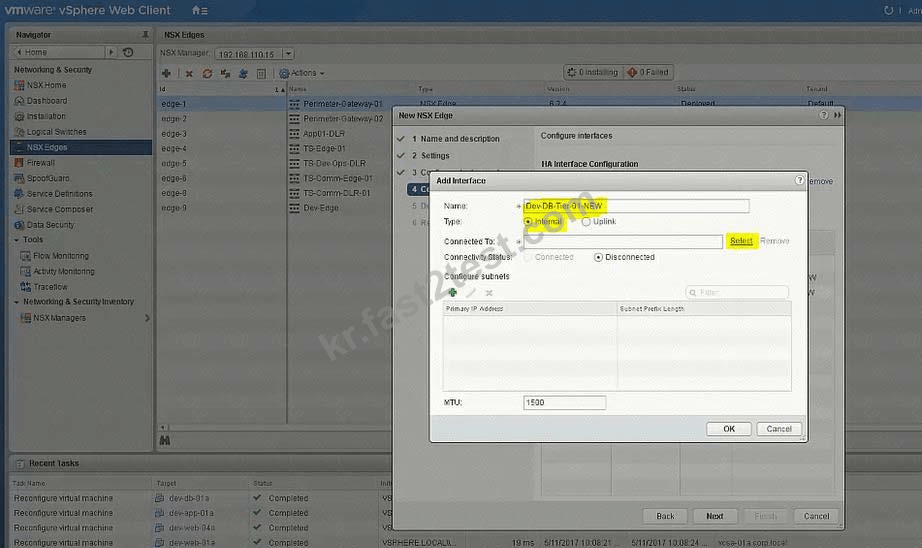


No need for below
To change the control plane failover within 15 seconds use the RESTClient as shown below or the Postman application in Chrome.
Open Firefox
Open RESTClient from Firefox
Authentication
Basic Authenticaion
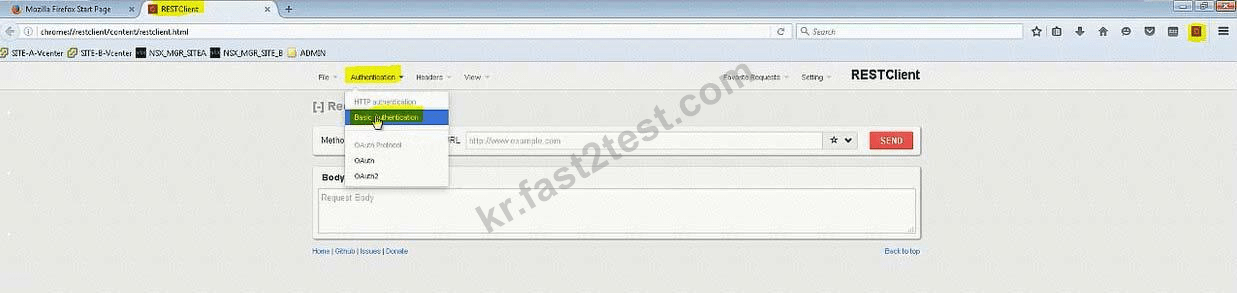
Admin
VMware1!
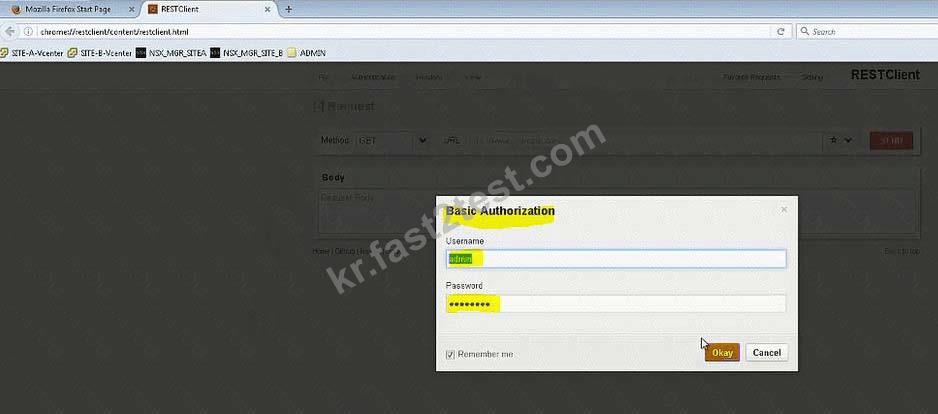
Headers
Custom Headers
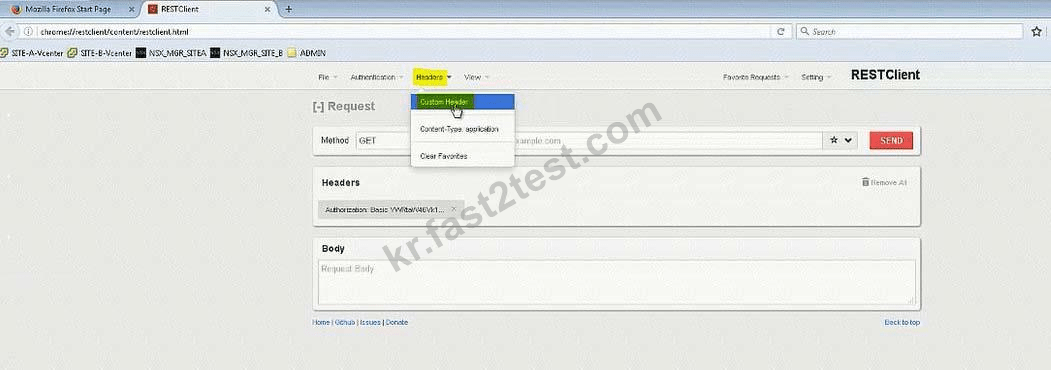
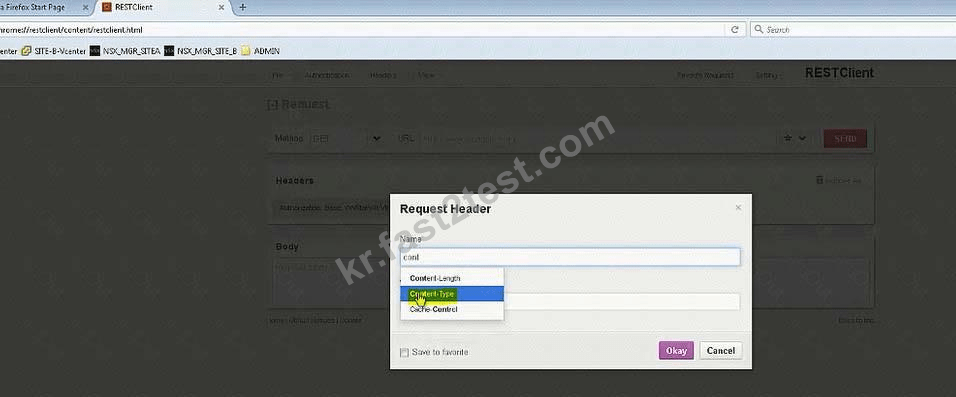
Content-Type
Application/xml

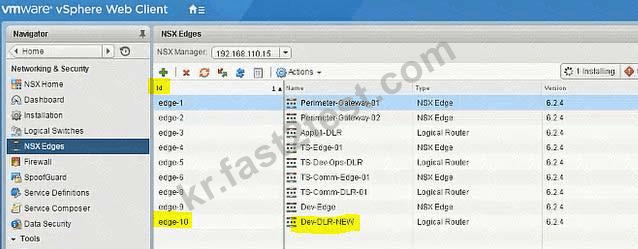
Note down the edge id of newly created DLR (in exam its edge-12)
There will be a NSX API guide on desktop and look for "declaredeadtime".
Or memorize below string:
URL: https://192.168.110.15/api/4.0/edges/edge-10/highavailability/config Note: in exam its edge-12 but make sure!
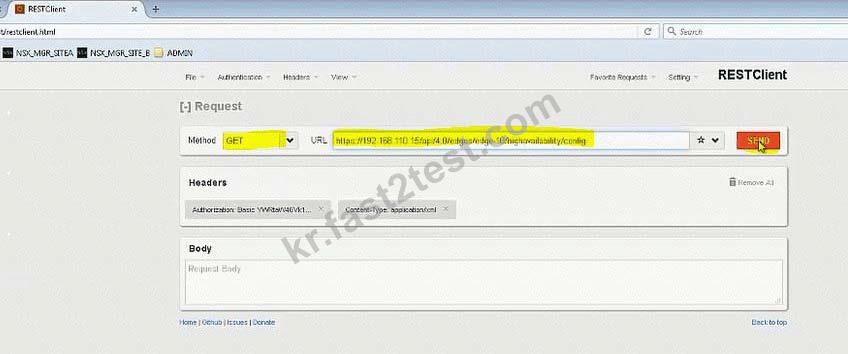
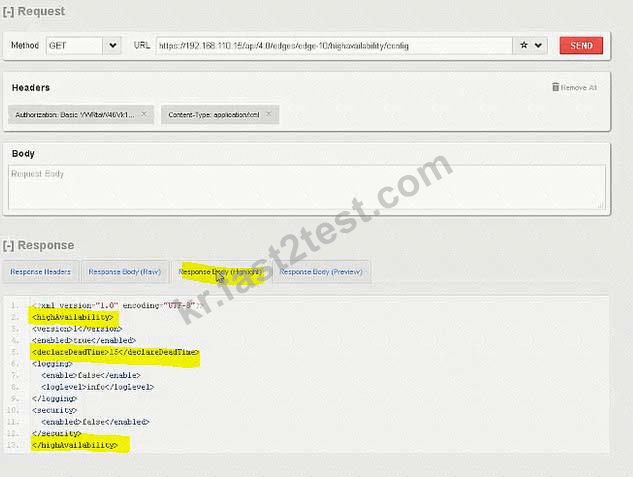
Change the value to 15
Body:
<highAvailability>
<declareDeadTime>15</declareDeadTime>
</highAvailability>


Add VMs to respective Logical Switches:
No need for below
To change the control plane failover within 15 seconds use the RESTClient as shown below or the Postman application in Chrome.
Open Firefox
Open RESTClient from Firefox
Authentication
Basic Authenticaion
Admin
VMware1!
Headers
Custom Headers
Content-Type
Application/xml
Note down the edge id of newly created DLR (in exam its edge-12)
There will be a NSX API guide on desktop and look for "declaredeadtime".
Or memorize below string:
URL: https://192.168.110.15/api/4.0/edges/edge-10/highavailability/config Note: in exam its edge-12 but make sure!
Change the value to 15
Body:
<highAvailability>
<declareDeadTime>15</declareDeadTime>
</highAvailability>