
Microsoft Advanced Solutions of Microsoft Exchange Server 2013 (70-342日本語版) - 70-342日本語무료 덤프문제 풀어보기


정답:

DRAG DROP

정답:

Explanation:
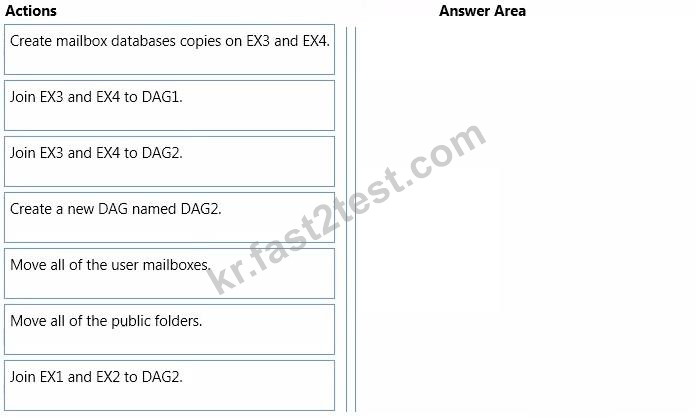
Box 1: Create a new DAG named DAG2.
Box 2: Join EX3 and EX4 to DAG2.
Box 3: Create mailbox database copies on EX3 and EX4.
Box 4: Move all of the user mailboxes.
Box 5: Move all public folders.
Note:
A general outline of what needs to be done is as follows:
* (step 1, step 2) Create the new Exchange 2013 DAG and add Exchange 2013 mailbox servers to the DAG.
* (Step 3) Create mailbox database copies within the Exchange 2013 DAG as required.
* (Step 4) Move mailboxes from databases in the Exchange 2010 DAG to the Exchange
2 013 DAG.
* (Step 5) We should move all the public folders last.
Note: Due to the changes in how public folders are stored, legacy Exchange mailboxes are unable to access the public folder hierarchy on Exchange 2013 servers or on Exchange
Online. However, user mailboxes on Exchange 2013 servers or Exchange Online can connect to legacy public folders. Exchange 2013 public folders and legacy public folders can't exist in your Exchange organization simultaneously. This effectively means that there's no coexistence between versions. Migrating public folders to Exchange Server 2013 or Exchange Online is currently a one-time cutover process.
For this reason, it's recommended that prior to migrating your public folders, you should first migrate your legacy mailboxes to Exchange 2013 or Exchange Online.

정답: D

정답: B
설명: (Fast2test 회원만 볼 수 있음)
DRAG DROP


정답:

Explanation:
Target 1: Export-ExchnageCertificate
Target 2: Import-ExchangeCertificate
Target 3: New-UMIPGateway
* Export the certificate from Exchange 2010.
* You can import and enable the certificate using the following command:
Import-ExchangeCertificate
* Create UM IP gateway.
The UM IP Gateway is responsible for traffic between the Lync Mediation Server and the
UM server.
HOTSPOT


정답:
Explanation:

Note:
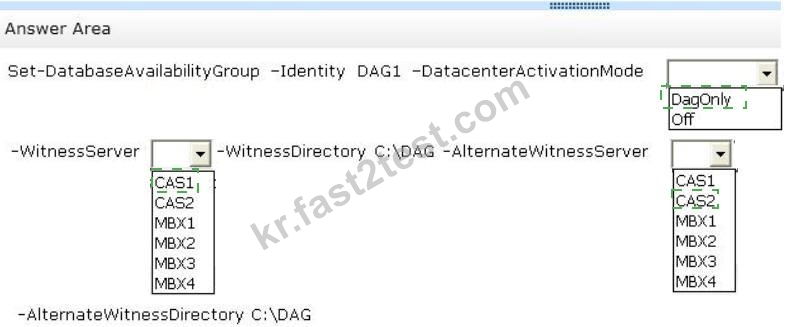
Set-DatabaseAvailabilityGroup
The Set-DatabaseAvailabilityGroup cmdlet enables you to manage DAG properties that can't be managed from the Exchange Administration Center (EAC), such as configuring network discovery, selecting the TCP port used for replication, and enabling datacenter activation coordination (DAC) mode.
Parameters include:
/ DatacenterActivationMode
The DatacenterActivationMode parameter specifies whether datacenter activation mode is disabled (Off) or enabled for the DAG (DagOnly).
/ WitnessServer
The WitnessServer parameter specifies the name of a server that will act as a witness for the DAG. The server specified can't be a member of the DAG.
/ AlternateWitnessServer
The AlternateWitnessServer parameter specifies the name of an alternate server that's used to store file share witness data. The specified server must not be a member of the
DAG that's configured to use it. This parameter is used only as part of a datacenter switchover process. If the DAG is extended across multiple datacenters in a site resilience configuration, we recommend preconfiguring the alternate witness server and directory.
정답: A,E
설명: (Fast2test 회원만 볼 수 있음)
정답: A,C
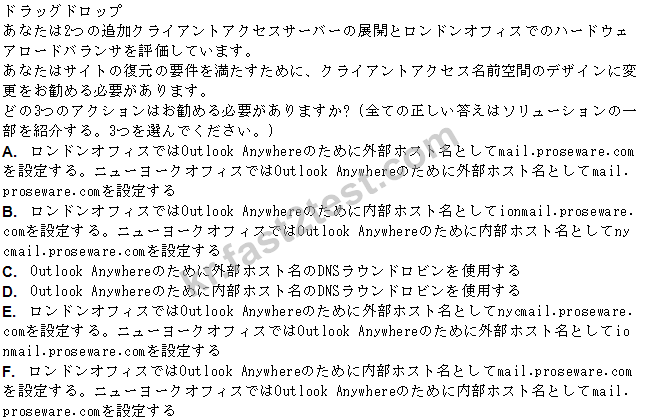
정답: A,E,F
설명: (Fast2test 회원만 볼 수 있음)

정답: B
HOTSPOT


정답:

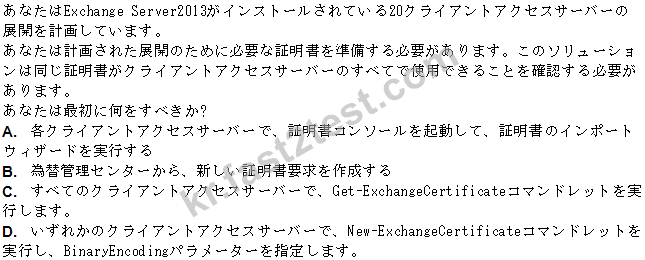
정답: D
설명: (Fast2test 회원만 볼 수 있음)

정답: A
HOTSPOT


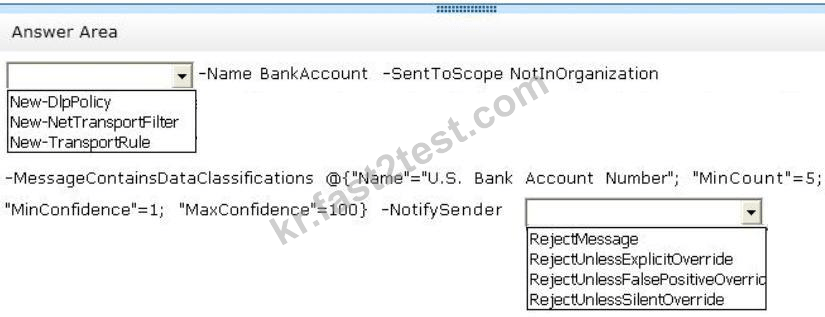
정답:

Explanation:
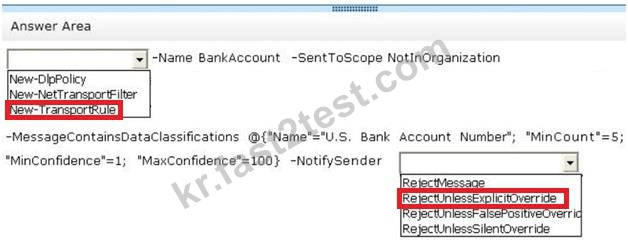
* Scenario: All users must be notified before they send an email message that contains any five bank account numbers to an external recipient. The users must be able to override the requirement if they have a valid business reason to send the email message.
* Transport rules apply actions to messages, most with corresponding action values.
RejectUnlessSilentOverride
Message is rejected unless the sender has chosen to override the policy restriction.
RejectUnlessExplicitOverride
This is the same as RejectUnlessSilentOverride, but the sender can also provide a justification for overriding the policy restriction.