
Microsoft MS Access 2010 - 77-885무료 덤프문제 풀어보기
You have a form named Assets created in Microsoft Office Access 2010. You have to make some changes in the formatting of the form. For this reason, you have opened the form in the Design view. Now, you want to display ruler and grid for making the formatting easy. Which of the following steps will you take to accomplish the task?
정답: C
설명: (Fast2test 회원만 볼 수 있음)
Which of the following datatypes is used to specify whether a condition is true or false?
정답: A
설명: (Fast2test 회원만 볼 수 있음)
An Access database, when splitted, is organized into two parts, i.e., back-end database and front-end database. Which of the following statements are true about the back-end database?
Each correct answer represents a complete solution. Choose two.
Each correct answer represents a complete solution. Choose two.
정답: A,D
설명: (Fast2test 회원만 볼 수 있음)
Which of the following are the advantages of dragging a field from the Field List window?
Each correct answer represents a complete solution. Choose three.
Each correct answer represents a complete solution. Choose three.
정답: B,C,D
설명: (Fast2test 회원만 볼 수 있음)
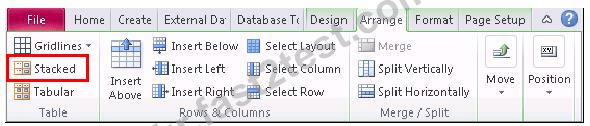
You are working on an Access report named Progress. You want to apply a layout to the report that is similar to a paper form, with labels to the left of each field. Mark the tab/button that you will click to accomplish the task.

정답:
Explanation:

The Stacked button applies a layout to the report which is similar to a paper form, with labels to the left of each field.
Choose the appropriate tasks that you can perform in the Design view of an Access form.


정답:

1 - Adjust the size of sections of design grid.
2 - Apply a new theme to the form.
3 - Modify the control's size.
4 - Organize controls logically for assisting data entry.
5 - Change the form elements' properties in the Property Sheet
6 - Add fields from the Field List.
7 - Add controls for limiting data entry selections.
Explanation:
Adjust the size of sections of design grid.
Apply a new theme to the form.
Modify the control's size.
Organize controls logically for assisting data entry.
Change the form elements' properties in the Property Sheet.
Add fields from the Field List.
Add controls for limiting data entry selections.