
시험 이름: Administrating SAP Business Technology Platform(C_ADBTP_2601)
인증사: SAP
인증시험: SAP Certified Associate

이상 63335+ 고객만족도
즉시 다운로드 SAP : C-ADBTP-2601 질문과 답변

결제후 바로 다운가능: 결제가 완료되면 시스템 자동으로 구입한 제품을 고객님 이메일로 발송해드립니다. (12 시간 이내에 받지못하셨다면 메일이나 온라인 서비스 상담으로 문의하십시오.) 참고 : 스팸메일함도 확인하는 것을 잊지 마십시오.
60일내 100% 환불보장
몇년간 시험결과에 대한 조사에 의하면 저희 덤프 합격율은 99.6%에 달한다는 결과를 얻었습니다.  저희 제품에 신심을 갖고 시험에 도전해보세요.
- 최고시험공부자료
- 세가지 버전 선택 가능
- 365일 무료 업데이트
- 수시로 공부가능
- 100% 안전한 쇼핑체험
- 불합격시 60일내 덤프비용 환불

- 실력테스트 가능한 소프트웨어버전
- 실제 시험환경 체험가능
- 시험패스에 자신감이 생김
- MS시스템을 지지
- 시험대비 테스트엔진버전
- 수시로 오프라인 연습

- 공부를 가장 편하게 할수 있는 온라인버전
- 즉시 다운로드 가능
- 모든 웹브라우저에 적용
- 언제든 공부 가능한 버전
- 높은 시험패스율
- Windows/Mac/Android/iOS등을 지지

- 출력가능한 PDF버전
- IT전문가가 출시한 공부자료
- 결제후 바로 다운가능
- 언제 어디서나 공부 가능
- 365일 무료 업데이트
- PDF버전샘플 무료다운
C-ADBTP-2601인증시험을 패스하여 자격증을 취득하는데 가장 쉬운 방법은 덤프를 공부하는 것입니다.C-ADBTP-2601 인증덤프는 실제 시험의 가장 최근 시험문제를 기준으로 하여 만들어진 최고품질 , 최고적중율 자료입니다. 덤프에 있는 문제와 답만 기억하시면 시험을 패스하는데 많은 도움이 됩니다.C-ADBTP-2601덤프를 선택해야 하는 이유:
유효한 시험자료로 시간절약 가능
C-ADBTP-2601시험덤프는 PDF버전, 온라인버전,테스트엔진버전 등 세가지 버전으로 되어있습니다.C-ADBTP-2601덤프 PDF버전은 인쇄가능한 버전이라 출력하셔서 공부하시면 좋습니다. 온라인버전은 APP버전인데 휴대폰으로 사용가능합니다. 출근길이나 퇴근길에서도 쉽게 공부하실수 있습니다. 테스트엔진버전은 PC에서 사용가능한 버전입니다. C-ADBTP-2601덤프의 원하시는 버전을 단독으로 구매하셔도 되고 패키지로 구매하셔도 됩니다.
가장 간편하게 공부가능
C-ADBTP-2601덤프는 시험예상문제와 기출문제로 되어있는데 실제 시험문제의 모든 유형을 포함하고 있어 덤프에 있는 문제와 답만 기억하시면 C-ADBTP-2601시험을 패스할수 있습니다.학원다닐 필요가 없기에 돈과 시간을 절약해드리고 가장 효율적으로 시험을 합격할수 있도록 도와드립니다.C-ADBTP-2601덤프제작팀의 부단한 노력으로 인하여 인증시험 패스는 더는 어려운 일이 아닙니다.
100% 시험통과율
구매하시면 구매일로부터 1년내에 C-ADBTP-2601덤프가 업데이트된다면 업데이트된 버전을 무료로 제공해드립니다.만약 C-ADBTP-2601덤프를 구매하시고 공부한후 시험에서 떨어지면 60일내 주문은 덤프비용 전액을 환불해드려 고객님의 이익을 최대한 보장해드립니다.환불신청은 주문번호와 불합격 성적표만 메일로 보내오시면 됩니다.
SAP C-ADBTP-2601 시험 요강 주제:
| 섹션 | 목표 |
|---|---|
| 계정 및 하위 계정 관리 | - 하위 계정 수명 주기 관리
|
| SAP Business Technology Platform 기초 | - BTP 글로벌 계정 개념 및 구조
|
| 연결성 및 통합 | - SAP BTP에서의 연결 설정
|
| 보안 및 ID 관리 | - 인증 및 권한 부여
|
| 모니터링 및 운영 | - 시스템 모니터링 및 문제 해결
|
| 과금, 권한 할당 및 수명 주기 관리 | - 상업 모델 및 사용량 제어
|
최신 SAP Certified Associate C-ADBTP-2601 무료샘플문제
SIMULATION
Enable Service Subscriptions
In the entitlements of a directory, add a service plan for a service subscription. Assign and create this subscription to/in a subaccount of the directory.
Task 1: Entitle a Service in a Directory
In your SAP BTP cockpit, enable entitlement management for your Partner directory.
In your Partner directory, entitle the standard (Application) service plan for the SAP Build Work Zone, standard edition.
정답:
See the Explanation below for complete solution.
Explanation:
Before You Start
Log in to the SAP BTP Cockpit.
Open the correct Global Account.
Go to Directories.
Open the Partner directory.
Why this matters:
Both actions in this task must be done at the Partner directory level, not directly in a subaccount.
Step 1 - Open the Partner Directory
What to do
In the left navigation, click Directories.
Select Partner.
Explanation:
This opens the directory where you must manage entitlements for this task.
What to verify
You should now be inside the Partner directory page.
Step 2 - Open Entitlements
What to do
Inside the Partner directory, go to Entitlements.
Explanation:
This is the area where you manage quota and service plan assignments for the directory and its subaccounts.
What to verify
You should see the entitlements page for Partner.
Step 3 - Enable Entitlement Management for the Partner Directory
What to do
In the Entitlements area, look for the option to Enable Entitlement Management.
Click Enable.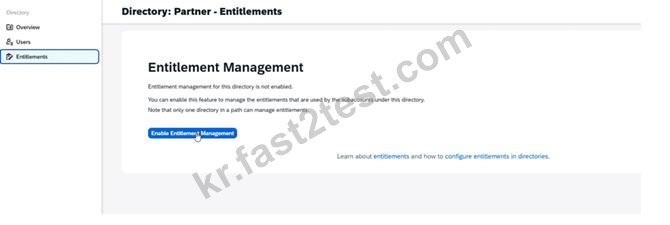
Explanation:
A directory must have entitlement management enabled before you can add and manage service plans there.
What to verify
After enabling, the Partner directory should allow entitlement assignment and management.
Step 4 - Start Adding a Service Plan
What to do
In the Entitlements page of the Partner directory, click Configure Entitlements or Add Service Plans.

Explanation:
This opens the service catalog where you can select the service and plan to add.
What to verify
You should see the list of available services and plans.
Step 5 - Find the Required Service
What to do
Search for or scroll to:
SAP Build Work Zone, standard edition
Select that service.
Explanation:
You must choose the exact service named in the task. Be careful not to select a different SAP Build service by mistake.
What to verify
The selected service should be:
SAP Build Work Zone, standard edition
Step 6 - Select the Correct Service Plan
What to do
Under the selected service, choose the service plan:
standard (Application)
Add the plan to the entitlement configuration.
Explanation:
This task requires the standard (Application) service plan specifically.
Do not choose another plan if more than one is listed.
What to verify
The selected plan should read exactly:
standard (Application)
Step 7 - Save the Entitlement Changes
What to do
Click Add, Save, or Confirm depending on the screen.
Then click Save for the entitlement configuration.
Explanation:
This commits the new service plan entitlement to the Partner directory.
What to verify
After saving, the entitlements list for Partner should include:
SAP Build Work Zone, standard edition
plan: standard (Application)
Final Expected Result for Task 1
Inside the Partner directory:
Entitlement management is enabled
The service SAP Build Work Zone, standard edition is entitled
The plan standard (Application) is added
Common Mistakes to Avoid
1. Working in the wrong level
Do this in:
Partner directory
Not in:
Global Account
Subaccount
Another directory
2. Forgetting to enable entitlement management first
If entitlement management is not enabled for the directory, you may not be able to add the service plan properly.
3. Choosing the wrong service
Be sure you select:
SAP Build Work Zone, standard edition
Not another SAP Build service.
4. Choosing the wrong plan
You must select:
standard (Application)
전체 10페이지 중 1페이지 보는 중.
전체 10문항 중 1-1문항 보는 중.
 1063 개 고객 리뷰고객 피드백 (*일부 유사하거나 오래된 댓글은 숨겨졌습니다.)
C-ADBTP-2601시험 패스하고 후기 올립니다. Fast2test버전 C-ADBTP-2601덤프랑 크게 다른건 없었습니다.
덤프에 있는 문제만 잘 암기하면 합격가능할듯 하니 덤프 받고 출력해서 시간날때마다 쭉 외워보세요.^^

토마토

SAP C-ADBTP-2601덤프 아직까지는 유효합니다.
보기순서가 섞여서 나오던데 확실하게 외워가시는게 좋을거 같습니다.

겨울아이
C-ADBTP-2601 덤프를 구매하여 일주일간 공부하고 시험봤는데 사이트에 말씀대로 높은 적중율을 자랑할만 합니다. 문항수도 그리 많지 않고 문제와 답 형식으로 되어있어 공부하기도 편했습니다.
치맥좋다
저는 SAP C-ADBTP-2601 덤프 pdf버전과 소프트웨어버전 모두 구매하고 공부했어요.
pdf버전 먼저 출력해서 외우고 소프트웨어버전으로 테스트해보고… 좋은 조합인거 같아요.
Fast2test덕분에 시험패스할수 있었어요. 감사합니다.

흔들린우동
IT 분야에 취업하다보니 자격증 취득이 필수네요.
C-ADBTP-2601 시험을 봐야 해서 Fast2test에서 덤프를 구입했는데 2문제정도는
덤프에 없는 문제였고 다른 문제는 거의 적중해서 한방에 패스가능했습니다. 감사합니다.

참치가 좋아
Fast2test덤프적중율이 장난 아닙니다. 덤프 아직 유효합니다.^^
혹여나 SAP에서 시험문제를 바꿨으면 어쩌나 떨리는 마음으로
시험을 치루었는데 한문제한문제 풀면서 안도감이 들었죠.
시험집사
우선 감사합니다.SAP C-ADBTP-2601시험 합격했습니다.
Fast2test덤프적중률이 매우 높았습니다.거의 덤프에서 다 나왔습니다.
시험 볼때 긴장 많이 됐었는데 자격증도 몇일 전에 받아서 너무 좋은 경험이었습니다.
김치우동
실무를 공부한후 따려는 자격증이지만 안심하려고 덤프도 구매했는데 덤프가 청심환 역할을 했네요.
SAP C-ADBTP-2601시험비가 비싸서 Fast2test덤프를 공부하는게 최고의 선택인것 같네요.

서버
PDF버전의 문제를 다 외우고 소프트웨어버전으로 가상 시험문제 풀어보고 집중적으로 공부하니 금방 외워지더라구요.
SAP C-ADBTP-2601, C_S4TM_2601, C_S4TM시험패스하고 후기남기고 갑니다.
비공개

IT 분야에 취업하다보니 자격증 취득이 필수네요.
C-ADBTP-2601 시험을 봐야 해서 Fast2test에서 덤프를 구입했는데 2문제정도는
덤프에 없는 문제였고 다른 문제는 거의 적중해서 한방에 패스가능했습니다. 감사합니다.
땡큐입니당
SAP C-ADBTP-2601 시험은 Fast2test덤프자료 고대로 나와서
덤프 답 그대로 찍고 합격했습니다. 좋은 덤프 감사합니다.
오싹한 시험
SAP C-ADBTP-2601덤프 시험패스 가능한 자료입니다.
덤프만 보고 괜찮은 점수로 합격했어요. 감사합니다.
시험증후군
많이 긴장했었는데 Fast2test에서 보내주신 덤프가 SAP C-ADBTP-2601시험문제를
완벽하게 담고 있어서 가볍게 합격할수 있는 시험이 되어버렸어요.
품질좋은 자료 신뢰가 갑니다. C_S4TM_2601시험도 잘 부탁드립니다.
꽃잎
덤프로 보는 자격증시험이라도 어설프게 공부하면 떨어질수 있을거 같아요.
저는 나름 열심히 외워서 시험봤는데도 아리까리한 문제가 좀 있었어요.물론 합격은 했구요.
공부하는김에 문제분석하면서 이해한 기초상에서 외우면 더 좋지 않을가 싶습니다.
구수한 덤프
Fast2test덕분에 C-ADBTP-2601시험 합격했어요.
덤프자체에 틀린 답이 조금 있긴 한데 만점받아도 좀 수상하니까 틀린 답이 있는것도 괜찮았어요.
회사원
비싼 SAP시험이라 불합격받으면 어쩌지 하며 긴장을 많이 했는데 붙어서 다행이네요.
다음 자격증도 취득해야 하는데 C-ADBTP-2601덤프자료 DC안될가요?
상상플러스
결제후 바로 다운가능 C-ADBTP-2601
덤프를 주문하시면 결제완료후 1분내에 주문시 사용한 메일로 덤프 다운로드 링크가 발송됩니다.
365 일 무료 업데이트서비스
구매일로부터 365일 업데이트서비스 제공, 365일후 업데이트를 받으려면 덤프를 50%가격으로 재구매 하시면 됩니다.

덤프비용 환불약속
덤프구매후 60일내에 시험을 보셔서 불합격 받으시면 덤프비용 전액을 환불해드리거나 다른 과목으로 교환해드립니다.
프라이버시보호정책
저희는 고객님의 프라이버시를 존중 합니다. 주문 진행, 서비스 제공, 그리고 지원과 새로운 출시 제품 또는 모든 업데이트 소식을 보내는 등 오로지 정해진 목적으로만 정보를 수집하고, 저장하고 사용 합니다.
관련시험

우리와 연락하기
문의할 점이 있으시면 메일을 보내오세요. 12시간이내에 답장드리도록 하고 있습니다.
근무시간: ( UTC+9 ) 9:00-24:00
월요일~토요일