
RedHat Red Hat Certified Engineer (RHCE) exam for Red Hat Enterprise Linux 8 - EX294무료 덤프문제 풀어보기
Rekey an existing Ansible vault as follows:
-----------------------------------------------
* Download Ansible vault from http:// classroom.example.com /secret.yml to /home/
admin/ansible/
* The current vault password is curabete
* The new vault password is newvare
* The vault remains in an encrypted state with the new password
-----------------------------------------------
* Download Ansible vault from http:// classroom.example.com /secret.yml to /home/
admin/ansible/
* The current vault password is curabete
* The new vault password is newvare
* The vault remains in an encrypted state with the new password
정답:
Solution as:
# pwd
/home/admin/ansible/
# wget http://classroom.example.com/secret.yml
# chmod 0600 newpassword.txt
# ansible-vault rekey vault.yml --new-vault-password-file=newpassword.txt
# pwd
/home/admin/ansible/
# wget http://classroom.example.com/secret.yml
# chmod 0600 newpassword.txt
# ansible-vault rekey vault.yml --new-vault-password-file=newpassword.txt
Create a file called packages.yml in /home/sandy/ansible to install some packages for the following hosts. On dev, prod and webservers install packages httpd, mod_ssl, and mariadb. On dev only install the development tools package. Also, on dev host update all the packages to the latest.
정답:
Solution as:
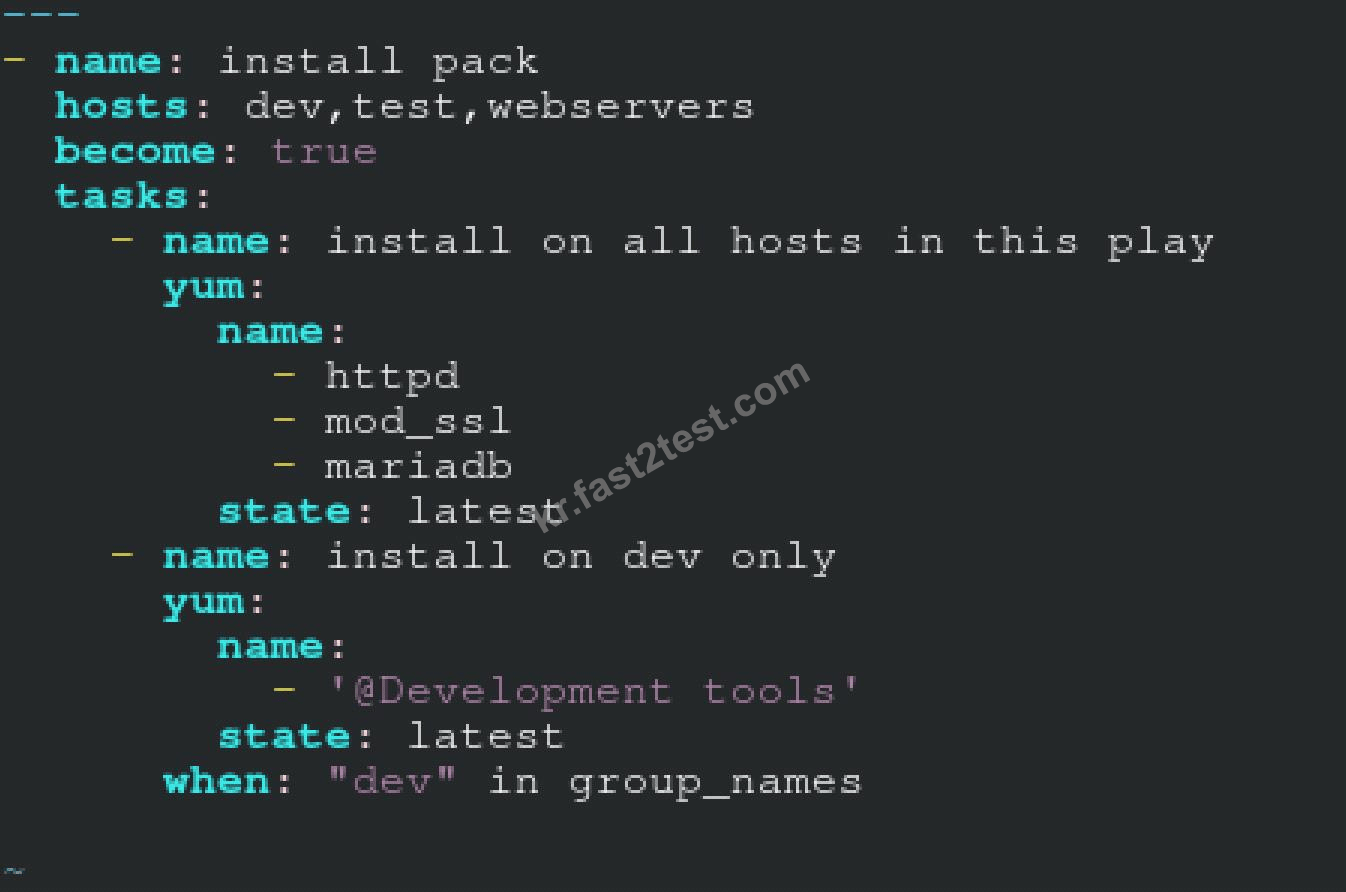
** NOTE 1 a more acceptable answer is likely 'present' since it's not asking to install the latest
state: present
** NOTE 2 need to update the development node
- name: update all packages on development node
yum:
name: '*'
state: latest
** NOTE 1 a more acceptable answer is likely 'present' since it's not asking to install the latest
state: present
** NOTE 2 need to update the development node
- name: update all packages on development node
yum:
name: '*'
state: latest
Create an Ansible vault to store user passwords as follows:
* The name of the vault is valut.yml
* The vault contains two variables as follows:
- dev_pass with value wakennym
- mgr_pass with value rocky
* The password to encrypt and decrypt the vault is atenorth
* The password is stored in the file /home/admin/ansible/password.txt
* The name of the vault is valut.yml
* The vault contains two variables as follows:
- dev_pass with value wakennym
- mgr_pass with value rocky
* The password to encrypt and decrypt the vault is atenorth
* The password is stored in the file /home/admin/ansible/password.txt
정답:
Solution as:
# pwd
/home/admin/ansible
# echo "atenorth" >password.txt
# chmod 0600 password.txt
# ansible-vault create vault.yml --vault-password-file=password.txt
---
- dev_pass: wakennym
- mgr_pass: rocky
:wq
# cat vault.yml
$ANSIBLE_VAULT;1.1;AES256
36383862376164316436353665343765643331393433373564613762666531313034336438353662
3464346331346461306337633632393563643531376139610a343531326130663266613533633562
38623439316631306463623761343939373263333134353264333834353264343934373765643737
3535303630626666370a643663366634383863393338616661666632353139306436316430616334
65386134393363643133363738656130636532346431376265613066326162643437643064313863
6633333537303334333437646163343666666132316639376531
# ansible-vault view vault.yml
password:******
---
- dev_pass: wakennym
- mgr_pass: rocky
# pwd
/home/admin/ansible
# echo "atenorth" >password.txt
# chmod 0600 password.txt
# ansible-vault create vault.yml --vault-password-file=password.txt
---
- dev_pass: wakennym
- mgr_pass: rocky
:wq
# cat vault.yml
$ANSIBLE_VAULT;1.1;AES256
36383862376164316436353665343765643331393433373564613762666531313034336438353662
3464346331346461306337633632393563643531376139610a343531326130663266613533633562
38623439316631306463623761343939373263333134353264333834353264343934373765643737
3535303630626666370a643663366634383863393338616661666632353139306436316430616334
65386134393363643133363738656130636532346431376265613066326162643437643064313863
6633333537303334333437646163343666666132316639376531
# ansible-vault view vault.yml
password:******
---
- dev_pass: wakennym
- mgr_pass: rocky
Create a role called apache in "/home/admin/ansible/roles" with the following
requirements:
--> The httpd package is installed, enabled on boot, and started.
--> The firewall is enabled and running with a rule to allow access to the web server.
--> template file index.html.j2 is used to create the file /var/www/html/index.html
with the output:
Welcome to HOSTNAME on IPADDRESS
--> Where HOSTNAME is the fqdn of the managed node and IPADDRESS is the IP-Address of
the managed node.
note: you have to create index.html.j2 file.
--> Create a playbook called httpd.yml that uses this role and the playbook runs on
hosts in the webservers host group.
requirements:
--> The httpd package is installed, enabled on boot, and started.
--> The firewall is enabled and running with a rule to allow access to the web server.
--> template file index.html.j2 is used to create the file /var/www/html/index.html
with the output:
Welcome to HOSTNAME on IPADDRESS
--> Where HOSTNAME is the fqdn of the managed node and IPADDRESS is the IP-Address of
the managed node.
note: you have to create index.html.j2 file.
--> Create a playbook called httpd.yml that uses this role and the playbook runs on
hosts in the webservers host group.
정답:
Solution as:
----------
# pwd
/home/admin/ansible/roles/
# ansible-galaxy init apache
# vim apache/vars/main.yml
---
# vars file for apache
http_pkg: httpd
firewall_pkg: firewalld
http_srv: httpd
firewall_srv: firewalld
rule: http
webpage: /var/www/html/index.html
template: index.html.j2
:wq!
# vim apache/tasks/package.yml
---
- name: Installing packages
yum:
name:
- "{{http_pkg}}"
- "{{firewall_pkg}}"
state: latest
:wq!
# vim apache/tasks/service.yml
---
- name: start and enable http service
service:
name: "{{http_srv}}"
enabled: true
state: started
- name: start and enable firewall service
service:
name: "{{firewall_srv}}"
enabled: true
state: started
:wq!
# vim apache/tasks/firewall.yml
---
- name: Adding http service to firewall
firewalld:
service: "{{rule}}"
state: enabled
permanent: true
immediate: true
:wq!
# vim apache/tasks/webpage.yml
---
- name: creating template file
template:
src: "{{template}}"
dest: "{{webpage}}"
notify: restart_httpd
!wq
# vim apache/tasks/main.yml
# tasks file for apache
- import_tasks: package.yml
- import_tasks: service.yml
- import_tasks: firewall.yml
- import_tasks: webpage.yml
:wq!
# vim apache/templates/index.html.j2
Welcome to {{ ansible_facts.fqdn }} on {{ ansible_facts.default_ipv4.address }}
# vim apache/handlers/main.yml
---
# handlers file for apache
- name: restart_httpd
service:
name: httpd
state: restarted
:wq!
# cd ..
# pwd
/home/admin/ansible/
# vim httpd.yml
---
- name: Including apache role
hosts: webservers
pre_tasks:
- name: pretask message
debug:
msg: 'Ensure webserver configuration'
roles:
- ./roles/apache
post_tasks:
- name: Check webserver
uri:
url: "http://{{ ansible_facts.default_ipv4.address }}"
return_content: yes
status_code: 200
:wq!
# ansible-playbook httpd.yml --syntax-check
# ansible-playbook httpd.yml
# curl http://serverx
----------
# pwd
/home/admin/ansible/roles/
# ansible-galaxy init apache
# vim apache/vars/main.yml
---
# vars file for apache
http_pkg: httpd
firewall_pkg: firewalld
http_srv: httpd
firewall_srv: firewalld
rule: http
webpage: /var/www/html/index.html
template: index.html.j2
:wq!
# vim apache/tasks/package.yml
---
- name: Installing packages
yum:
name:
- "{{http_pkg}}"
- "{{firewall_pkg}}"
state: latest
:wq!
# vim apache/tasks/service.yml
---
- name: start and enable http service
service:
name: "{{http_srv}}"
enabled: true
state: started
- name: start and enable firewall service
service:
name: "{{firewall_srv}}"
enabled: true
state: started
:wq!
# vim apache/tasks/firewall.yml
---
- name: Adding http service to firewall
firewalld:
service: "{{rule}}"
state: enabled
permanent: true
immediate: true
:wq!
# vim apache/tasks/webpage.yml
---
- name: creating template file
template:
src: "{{template}}"
dest: "{{webpage}}"
notify: restart_httpd
!wq
# vim apache/tasks/main.yml
# tasks file for apache
- import_tasks: package.yml
- import_tasks: service.yml
- import_tasks: firewall.yml
- import_tasks: webpage.yml
:wq!
# vim apache/templates/index.html.j2
Welcome to {{ ansible_facts.fqdn }} on {{ ansible_facts.default_ipv4.address }}
# vim apache/handlers/main.yml
---
# handlers file for apache
- name: restart_httpd
service:
name: httpd
state: restarted
:wq!
# cd ..
# pwd
/home/admin/ansible/
# vim httpd.yml
---
- name: Including apache role
hosts: webservers
pre_tasks:
- name: pretask message
debug:
msg: 'Ensure webserver configuration'
roles:
- ./roles/apache
post_tasks:
- name: Check webserver
uri:
url: "http://{{ ansible_facts.default_ipv4.address }}"
return_content: yes
status_code: 200
:wq!
# ansible-playbook httpd.yml --syntax-check
# ansible-playbook httpd.yml
# curl http://serverx