
Microsoft 365 Security Administration - MS-500무료 덤프문제 풀어보기
You are evaluating which devices are compliant in Intune.
For each of the following statements, select Yes if the statement is true. Otherwise, select No.
NOTE: Each correct selection is worth one point.
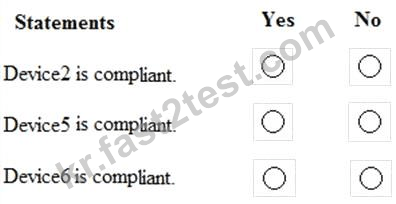
For each of the following statements, select Yes if the statement is true. Otherwise, select No.
NOTE: Each correct selection is worth one point.
정답:

Explanation

You plan to deploy a new Microsoft 365 Subscription that will contain 500 users.
You need to ensure that the following actions are performed the users sign in to the subscription Evaluate the users' risk level based on their location and travel.
Require high-risk users to sign in by using Azure Multi-Factor Authentication (Azure MFA).
The solution must minimize cost.
Which license should you assign to each user?
You need to ensure that the following actions are performed the users sign in to the subscription Evaluate the users' risk level based on their location and travel.
Require high-risk users to sign in by using Azure Multi-Factor Authentication (Azure MFA).
The solution must minimize cost.
Which license should you assign to each user?
정답: C
You have a Microsoft Azure Active Directory (Azure AD) tenant named contoso.com that contains the users shown in the following table.
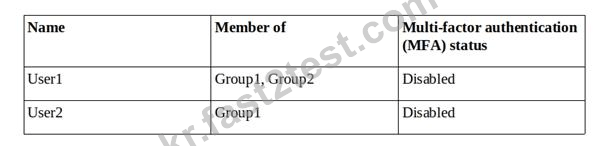
You create and enforce an Azure AD Identity Protection sign-in risk policy that has the following settings:
Assignments: Include Group1, Exclude Group2
Conditions: Sign in risk of Low and above
Access: Allow access, Require password multi-factor authentication
You need to identify how the policy affects User1 and User2.
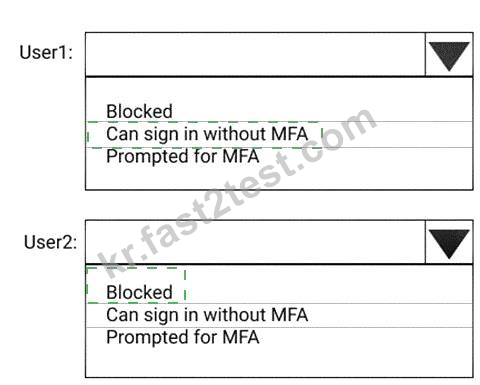
What occurs when each user signs in from an anonymous IP address? To answer, select the appropriate options in the answer area.
NOTE: Each correct selection is worth one point.

You create and enforce an Azure AD Identity Protection sign-in risk policy that has the following settings:
Assignments: Include Group1, Exclude Group2
Conditions: Sign in risk of Low and above
Access: Allow access, Require password multi-factor authentication
You need to identify how the policy affects User1 and User2.
What occurs when each user signs in from an anonymous IP address? To answer, select the appropriate options in the answer area.
NOTE: Each correct selection is worth one point.
정답:
Explanation

A user stores the following files in Microsoft OneDrive:
File.docx
ImportantFile.docx
File_Important.docx
You create a Microsoft Cloud App Security file policy Policy1 that has the filter shown in the following exhibit.

To which files does Policy1 apply?
File.docx
ImportantFile.docx
File_Important.docx
You create a Microsoft Cloud App Security file policy Policy1 that has the filter shown in the following exhibit.
To which files does Policy1 apply?
정답: A
설명: (Fast2test 회원만 볼 수 있음)
Note: This question is part of a series of questions that present the same scenario. Each question in the series contains a unique solution that might meet the stated goals. Some question sets might have more than one correct solution, while others might not have a correct solution.
After you answer a question in this section, you will NOT be able to return to it. As a result, these questions will not appear in the review screen.
You have a Microsoft 365 subscription that contains the users shown in the following table.
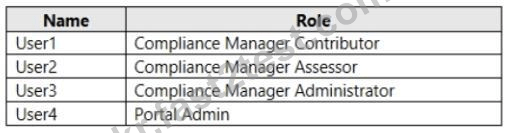
You discover that all the users in the subscription can access Compliance Manager reports.
The Compliance Manager Reader role is not assigned to any users.
You need to recommend a solution to prevent a user named User5 from accessing the Compliance Manager reports.
Solution: You recommend assigning the Compliance Manager Reader role to User5.
Does this meet the goal?
After you answer a question in this section, you will NOT be able to return to it. As a result, these questions will not appear in the review screen.
You have a Microsoft 365 subscription that contains the users shown in the following table.
You discover that all the users in the subscription can access Compliance Manager reports.
The Compliance Manager Reader role is not assigned to any users.
You need to recommend a solution to prevent a user named User5 from accessing the Compliance Manager reports.
Solution: You recommend assigning the Compliance Manager Reader role to User5.
Does this meet the goal?
정답: B
You need to create a policy that identifies content in Microsoft OneDrive that contains credit card numbers.
To complete this task, sign in to the Microsoft 365 portal.
To complete this task, sign in to the Microsoft 365 portal.
정답:
See explanation below.
Explanation
You need to configure auto-labeling in 'simulation' mode. In the policy, you can select the 'Credit Card' sensitive info type.
In the Microsoft 365 compliance center, navigate to sensitivity labels:
Solutions > Information protection
Select the Auto-labeling (preview) tab.
Select + Create policy.
For the page Choose info you want this label applied to: Select one of the templates, such as Financial or Privacy. You can refine your search by using the Show options for dropdown. Or, select Custom policy if the templates don't meet your requirements. Select Next.
For the page Name your auto-labeling policy: Provide a unique name, and optionally a description to help identify the automatically applied label, locations, and conditions that identify the content to label.
For the page Choose locations where you want to apply the label: Select OneDrive. Then select Next.
For the Define policy settings page: Keep the default of Find content that contains to define rules that identify content to label across all your selected locations. The rules use conditions that include sensitive information types and sharing options. For sensitive information types, you can select both built-in and custom sensitive information types.
Then select Next.
For the Set up rules to define what content is labeled page: Select + Create rule and then select Next.
On the Create rule page, name and define your rule, using sensitive information types and then select Save.
Click Next.
For the Choose a label to auto-apply page: Select + Choose a label, select a label from the Choose a sensitivity label pane, and then select Next.
For the Decide if you want to run policy simulation now or later page: Select Run policy in simulation mode if you're ready to run the auto-labeling policy now, in simulation mode. Otherwise, select Leave policy turned off. Select Next.
For the Summary page: Review the configuration of your auto-labeling policy and make any changes that needed, and complete the wizard.
Reference:
https://docs.microsoft.com/en-us/microsoft-365/compliance/apply-sensitivity-label-automatically?view=o365-wo
Explanation
You need to configure auto-labeling in 'simulation' mode. In the policy, you can select the 'Credit Card' sensitive info type.
In the Microsoft 365 compliance center, navigate to sensitivity labels:
Solutions > Information protection
Select the Auto-labeling (preview) tab.
Select + Create policy.
For the page Choose info you want this label applied to: Select one of the templates, such as Financial or Privacy. You can refine your search by using the Show options for dropdown. Or, select Custom policy if the templates don't meet your requirements. Select Next.
For the page Name your auto-labeling policy: Provide a unique name, and optionally a description to help identify the automatically applied label, locations, and conditions that identify the content to label.
For the page Choose locations where you want to apply the label: Select OneDrive. Then select Next.
For the Define policy settings page: Keep the default of Find content that contains to define rules that identify content to label across all your selected locations. The rules use conditions that include sensitive information types and sharing options. For sensitive information types, you can select both built-in and custom sensitive information types.
Then select Next.
For the Set up rules to define what content is labeled page: Select + Create rule and then select Next.
On the Create rule page, name and define your rule, using sensitive information types and then select Save.
Click Next.
For the Choose a label to auto-apply page: Select + Choose a label, select a label from the Choose a sensitivity label pane, and then select Next.
For the Decide if you want to run policy simulation now or later page: Select Run policy in simulation mode if you're ready to run the auto-labeling policy now, in simulation mode. Otherwise, select Leave policy turned off. Select Next.
For the Summary page: Review the configuration of your auto-labeling policy and make any changes that needed, and complete the wizard.
Reference:
https://docs.microsoft.com/en-us/microsoft-365/compliance/apply-sensitivity-label-automatically?view=o365-wo
You haw a Microsoft 365 subscription.
You receive a General Data Protection Regulation (GOPR) request for the custom dictionary of a user From The Compliance admin center you need to create a content search, should you configure the content search?
You receive a General Data Protection Regulation (GOPR) request for the custom dictionary of a user From The Compliance admin center you need to create a content search, should you configure the content search?
정답: D
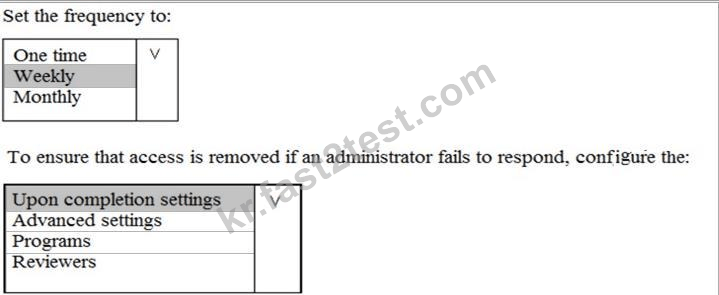
You plan to configure an access review to meet the security requirements for the workload administrators. You create an access review policy and specify the scope and a group.
Which other settings should you configure? To answer, select the appropriate options in the answer area.
NOTE: Each correct selection is worth one point.
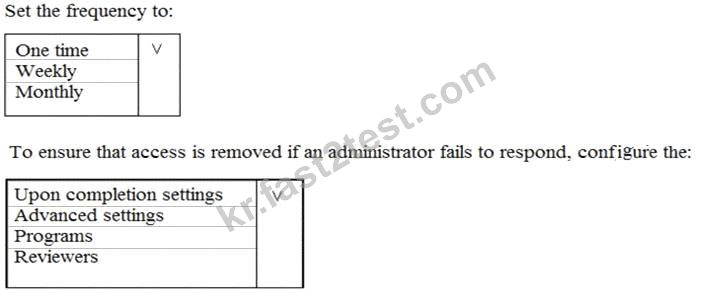
Which other settings should you configure? To answer, select the appropriate options in the answer area.
NOTE: Each correct selection is worth one point.
정답:

Explanation
Topic 3, Contoso, Ltd
Overview
Contoso, Ltd. is a consulting company that has a main office in Montreal and three branch offices in Seattle, and New York.
The company has the offices shown in the following table.

Contoso has IT, human resources (HR), legal, marketing, and finance departments. Contoso uses Microsoft
365.
Existing Environment
Infrastructure
The network contains an Active Directory domain named contoso.com that is synced to a Microsoft Azure Active Directory (Azure AD) tenant. Password writeback is enabled.
The domain contains servers that run Windows Server 2016. The domain contains laptops and desktop computers that run Windows 10 Enterprise.
Each client computer has a single volume.
Each office connects to the Internet by using a NAT device. The offices have the IP addresses shown in the following table.

Named locations are defined in Azure AD as shown in the following table.

From the Multi-Factor Authentication page, an address space of 198.35.3.0/24 is defined in the trusted IPs list.
Azure Multi-Factor Authentication (MFA) is enabled for the users in the finance department.
The tenant contains the users shown in the following table.
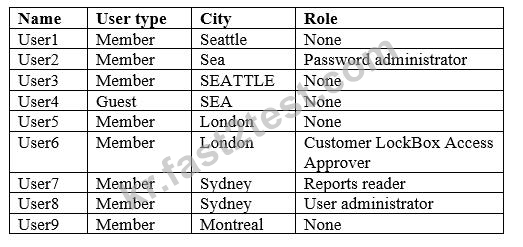
The tenant contains the groups shown in the following table.

Customer Lockbox is enabled in Microsoft 365.
Microsoft Intune Configuration
The devices enrolled in Intune are configured as shown in the following table.
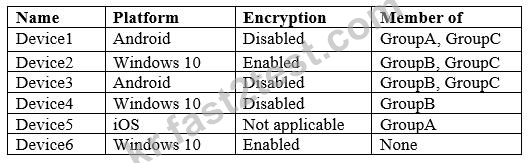
The device compliance policies in Intune are configured as shown in the following table.

The device compliance policies have the assignments shown in the following table.

The Mark devices with no compliance policy assigned as setting is set to Compliant.
Requirements
Technical Requirements
Contoso identifies the following technical requirements:
Use the principle of least privilege
Enable User1 to assign the Reports reader role to users
Ensure that User6 approves Customer Lockbox requests as quickly as possible Ensure that User9 can implement Azure AD Privileged Identity Management
You have a Microsoft 365 subscription.
You have a Microsoft SharePoint Online site named Site1.
The files in Site1 are protected by using Microsoft Azure Information Protection.
From the Security & Compliance admin center, you create a label that designates personal data.
You need to auto-apply the new label to all the content in Site1.
What should you do first?
You have a Microsoft SharePoint Online site named Site1.
The files in Site1 are protected by using Microsoft Azure Information Protection.
From the Security & Compliance admin center, you create a label that designates personal data.
You need to auto-apply the new label to all the content in Site1.
What should you do first?
정답: B
설명: (Fast2test 회원만 볼 수 있음)