
시험 이름: Nutanix Certified Master - Multicloud Infrastructure v6.10
인증사: Nutanix
인증시험: Master Level

이상 63334+ 고객만족도
다운로드 Nutanix : NCM-MCI 질문 & 답 PDF & Test Software

결제후 바로 다운가능: 결제가 완료되면 시스템 자동으로 구입한 제품을 고객님 이메일로 발송해드립니다. (12 시간 이내에 받지못하셨다면 메일이나 온라인 서비스 상담으로 문의하십시오.) 참고 : 스팸메일함도 확인하는 것을 잊지 마십시오.
60일내 100% 환불보장
몇년간 시험결과에 대한 조사에 의하면 저희 덤프 합격율은 99.6%에 달한다는 결과를 얻었습니다.  저희 제품에 신심을 갖고 시험에 도전해보세요.
- 최고시험공부자료
- 세가지 버전 선택 가능
- 365일 무료 업데이트
- 수시로 공부가능
- 100% 안전한 쇼핑체험
- 불합격시 60일내 덤프비용 환불
NCM-MCI 덤프 PDF버전
- 출력가능한 PDF버전
- IT전문가가 출시한 공부자료
- 결제후 바로 다운가능
- 언제 어디서나 공부 가능
- 365일 무료 업데이트
- PDF버전샘플 무료다운
- PDF버전 샘플문제 다운받기
- 문항수: 18
- 최신업데이트체크시간: Oct 14, 2026
- 가격: $59.98
NCM-MCI 소프트웨어버전
- 실력테스트 가능한 소프트웨어버전
- 실제 시험환경 체험가능
- 시험패스에 자신감이 생김
- MS시스템을 지지
- 시험대비 테스트엔진버전
- 수시로 오프라인 연습
- MS프로그램 캡쳐보기
- 문항수: 18
- 최신업데이트체크시간: Oct 14, 2026
- 가격: $59.98
NCM-MCI 온라인버전
- 공부를 가장 편하게 할수 있는 온라인버전
- 즉시 다운로드 가능
- 모든 웹브라우저에 적용
- 언제든 공부 가능한 버전
- 높은 시험패스율
- Windows/Mac/Android/iOS등을 지지
- 온라인버전 체험하기
- 문항수: 18
- 최신업데이트체크시간: Oct 14, 2026
- 가격: $59.98
구매전 덤프 샘플문제 다운
NCM-MCI덤프를 구매하기전에 사이트에서 해당 덤프의 무료샘플을 다운받아 덤프품질을 체크해보실수 있습니다. Nutanix Certified Master - Multicloud Infrastructure v6.10덤프를 구매하시면 구매일로부터 1년내에 덤프가 업데이트된다면 업데이트된 버전을 무료로 제공해드립니다.만약 NCM-MCI덤프를 구매하고 공부한후 NCM-MCI시험에서 떨어지면 60일내 주문은 덤프비용 전액을 환불해드려 고객님의 이익을 최대한 보장해드립니다.
시험전 20-30시간의 공부시간
자격증을 취득하려면 오랜시간동안 시험공부를 해야 한다고 생각하시는 분들이 많습니다. 하지만 이는 NCM-MCI덤프가 아닌 다른 공부방법에 적용되는 보편적인 생각일뿐입니다. NCM-MCI덤프를 공부하시는데는 20~30시간만 사용하시면 됩니다.덤프만 있으면 다른 공부자료는 필요하지 않습니다.덤프는 Nutanix Certified Master - Multicloud Infrastructure v6.10시험문제의 모든 범위와 유형을 포함하고 있어 NCM-MCI덤프에 있는 문제와 답만 기억하시면 시험문제가 변경되지 않는다면 합격을 예약한것과 같다고 보시면 됩니다.
우선 시험센터에서 정확한 시험코드를 확인하고 그 코드와 동일한 코드로 되어있는 덤프를 구매하셔서 덤프에 있는 문제와 답을 기억하시면 시험을 쉽게 패스하실수 있습니다. NCM-MCI덤프는 가장 최근 기출문제를 기준으로 제작되기에 Nutanix Certified Master - Multicloud Infrastructure v6.10시험문제가 변경되지 않는한 100%에 가까운 적중율을 보장해 시험에서 패스하는데 가장 좋은 동반자로 되어드릴것입니다.
Nutanix NCM-MCI 시험요강:
| 주제 | 소개 |
|---|---|
| 주제 1 |
|
| 주제 2 |
|
| 주제 3 |
|
| 주제 4 |
|
| 주제 5 |
|
퍼펙트한 시험대비자료
NCM-MCI 최신덤프는 NCM-MCI실제시험의 모든 범위를 커버하고 있고 모든 시험유형이 포함되어 있어 시험대비 공부의 완벽한 선택입니다.최신버전 덤프는 Nutanix Certified Master - Multicloud Infrastructure v6.10시험문제에 근거하여 만들어진 시험준비 공부가이드로서 학원공부 필요없이 덤프공부 만으로도 시험을 한방에 패스할수 있습니다.자격증을 취득하시면 국제적으로 인정받기에 취직이나 승진 혹은 이직에 힘을 가해드립니다.
최신 Master Level NCM-MCI 무료샘플문제
Task 3
An administrator needs to assess performance gains provided by AHV Turbo at the guest level. To perform the test the administrator created a Windows 10 VM named Turbo with the following configuration.
1 vCPU
8 GB RAM
SATA Controller
40 GB vDisk
The stress test application is multi-threaded capable, but the performance is not as expected with AHV Turbo enabled. Configure the VM to better leverage AHV Turbo.
Note: Do not power on the VM. Configure or prepare the VM for configuration as best you can without powering it on.
정답:
See the Explanation for step by step solution
Explanation:
To configure the VM to better leverage AHV Turbo, you can follow these steps:
Log in to Prism Element of cluster A using the credentials provided.
Go to VM > Table and select the VM named Turbo.
Click on Update and go to Hardware tab.
Increase the number of vCPUs to match the number of multiqueues that you want to enable. For example, if you want to enable 8 multiqueues, set the vCPUs to 8. This will improve the performance of multi-threaded workloads by allowing them to use multiple processors.
Change the SCSI Controller type from SATA to VirtIO. This will enable the use of VirtIO drivers, which are required for AHV Turbo.
Click Save to apply the changes.
Power off the VM if it is running and mount the Nutanix VirtIO ISO image as a CD-ROM device. You can download the ISO image from Nutanix Portal.
Power on the VM and install the latest Nutanix VirtIO drivers for Windows 10. You can follow the instructions from Nutanix Support Portal.
After installing the drivers, power off the VM and unmount the Nutanix VirtIO ISO image.
Power on the VM and log in to Windows 10.
Open a command prompt as administrator and run the following command to enable multiqueue for the VirtIO NIC:
ethtool -L eth0 combined 8
Replace eth0 with the name of your network interface and 8 with the number of multiqueues that you want to enable. You can use ipconfig /all to find out your network interface name.
Restart the VM for the changes to take effect.
You have now configured the VM to better leverage AHV Turbo. You can run your stress test application again and observe the performance gains.
https://portal.nutanix.com/page/documents/kbs/details?targetId=kA00e000000LKPdCAO change vCPU to 2/4 ?
Change SATA Controller to SCSI:
acli vm.get Turbo
Output Example:
Turbo {
config {
agent_vm: False
allow_live_migrate: True
boot {
boot_device_order: "kCdrom"
boot_device_order: "kDisk"
boot_device_order: "kNetwork"
uefi_boot: False
}
cpu_passthrough: False
disable_branding: False
disk_list {
addr {
bus: "ide"
index: 0
}
cdrom: True
device_uuid: "994b7840-dc7b-463e-a9bb-1950d7138671"
empty: True
}
disk_list {
addr {
bus: "sata"
index: 0
}
container_id: 4
container_uuid: "49b3e1a4-4201-4a3a-8abc-447c663a2a3e"
device_uuid: "622550e4-fb91-49dd-8fc7-9e90e89a7b0e"
naa_id: "naa.6506b8dcda1de6e9ce911de7d3a22111"
storage_vdisk_uuid: "7e98a626-4cb3-47df-a1e2-8627cf90eae6"
vmdisk_size: 10737418240
vmdisk_uuid: "17e0413b-9326-4572-942f-68101f2bc716"
}
flash_mode: False
hwclock_timezone: "UTC"
machine_type: "pc"
memory_mb: 2048
name: "Turbo"
nic_list {
connected: True
mac_addr: "50:6b:8d:b2:a5:e4"
network_name: "network"
network_type: "kNativeNetwork"
network_uuid: "86a0d7ca-acfd-48db-b15c-5d654ff39096"
type: "kNormalNic"
uuid: "b9e3e127-966c-43f3-b33c-13608154c8bf"
vlan_mode: "kAccess"
}
num_cores_per_vcpu: 2
num_threads_per_core: 1
num_vcpus: 2
num_vnuma_nodes: 0
vga_console: True
vm_type: "kGuestVM"
}
is_rf1_vm: False
logical_timestamp: 2
state: "Off"
uuid: "9670901f-8c5b-4586-a699-41f0c9ab26c3"
}
acli vm.disk_create Turbo clone_from_vmdisk=17e0413b-9326-4572-942f-68101f2bc716 bus=scsi remove the old disk acli vm.disk_delete 17e0413b-9326-4572-942f-68101f2bc716 disk_addr=sata.0
Refer to the exhibit.
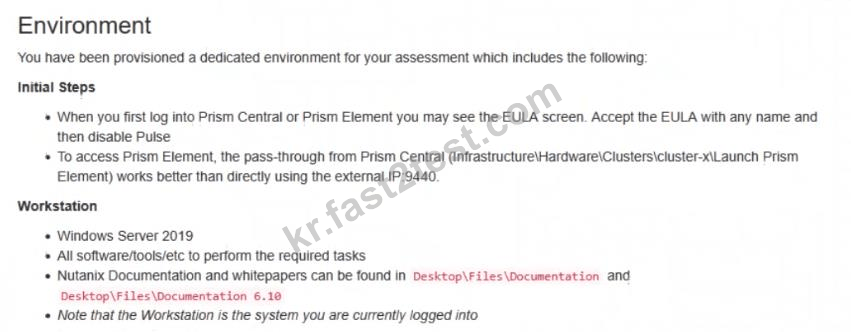
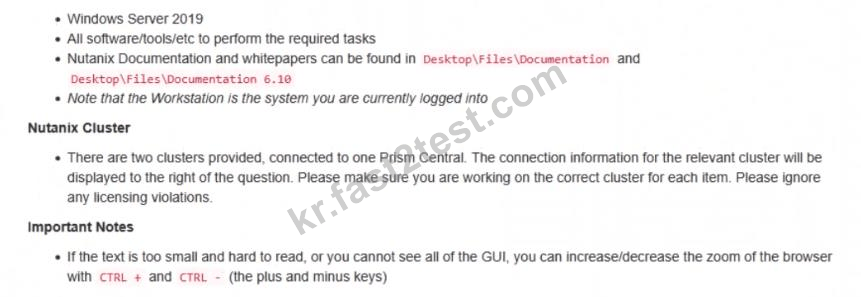
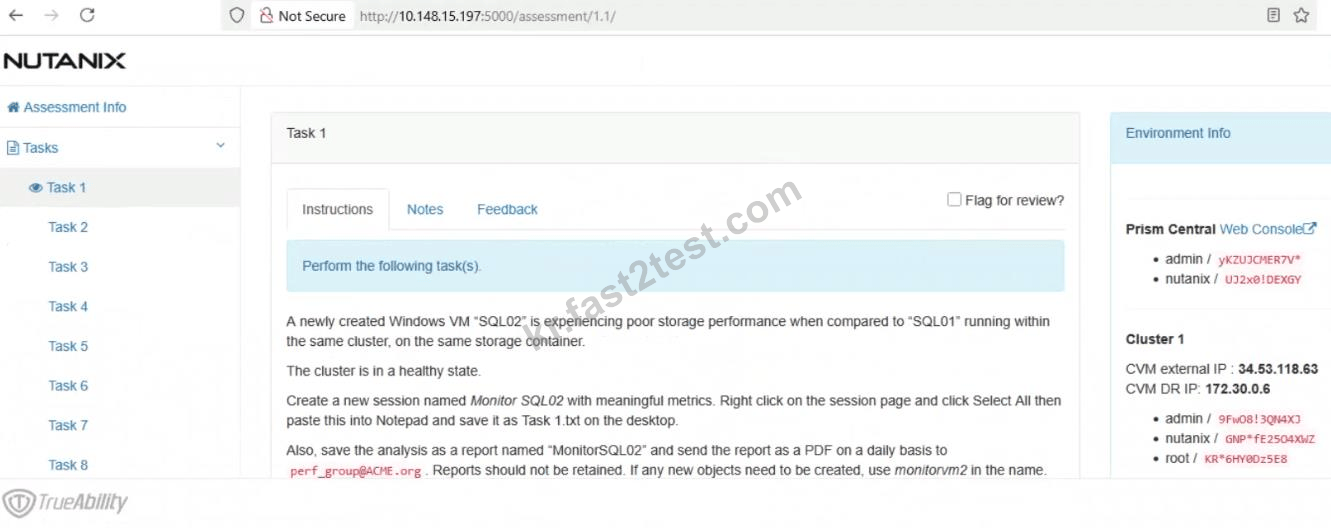

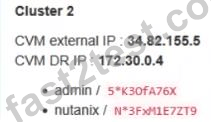
Task1
A newly created Windows VM "SQL02" is experiencing poor storage performance when compared to "SQL01" running within the same cluster, on the same storage container.
The cluster is in a healthy state.
Create a new session named Monitor SQL02 with meaningful metrics. Right click on the session page and click Select All then paste this into Notepad and save it as Task 1.txt on the desktop.
Also, save the analysis as a report named "MonitorSQL02" and send the report as a PDF on a daily basis to [email protected]. Reports should not be retained. If any new objects need to be created, use monitorvm2 in the name.
Finally, correct the issue within "SQL02"
Notes:
Do not power on the VMs.
While you will be creating a session, you will need to examine the VM configurations to determine the issue.
Do not delete the VM to resolve the issue, any other destructive change is acceptable
정답:
See the Explanation
Explanation:
This is a classic Nutanix performance troubleshooting scenario. The issue is almost certainly that the VM was created using the wrong Disk Bus Type (IDE or SATA instead of SCSI).
Here is the step-by-step solution to complete Task 1.
Part 1: Analysis and Reporting
Create the Session
Log in to Prism Central (or Prism Element, depending on the exam environment, but Analysis is usually a PC feature).
Navigate to Operations -> Analysis.
Click New Session.
Name: Monitor SQL02
Entity: Search for and select the VM named SQL02.
Metrics: Since the issue is storage performance, search for and add these specific metrics:
Hypervisor IOPS (or Controller IOPS)
Hypervisor IO Latency (or Controller IO Latency)
Hypervisor IO Bandwidth
Click Save.
Save Session Data (Task 1.txt)
Open the "Monitor SQL02" session you just created.
(Per instructions): Right-click anywhere on the chart/data area -> Click Select All.
Copy the selected text (Ctrl+C).
Open Notepad on the provided desktop.
Paste the data.
Save the file as Task 1.txt on the Desktop.
Create and Schedule the Report
While still in the Analysis session, click the Create Report (or "Add to Report") button.
Report Name: MonitorSQL02
Report Settings:
Format: PDF
Frequency: Daily
Email Recipient: [email protected]
Retention: 0 (or "Do not retain", as requested).
Note: If the system forces you to create a new Report object and MonitorSQL02 is rejected, use monitorvm2 as the name per the instructions.
Save/Schedule the report.
Part 2: Diagnose and Fix the Issue
The Issue:
VM SQL02 was likely created with its data disks set to IDE or SATA.
Why this causes poor performance: IDE/SATA are emulated hardware with high CPU overhead and low queue depths (single-threaded).
The Standard: SQL01 (the healthy VM) is using SCSI, which is multithreaded and optimized for virtualization.
The Fix (Steps):
Navigate to the VM list in Prism.
Select SQL02 and click Update (or Edit).
Scroll down to the Disks section.
Identify the data disk(s). You will see the Bus Type listed as IDE or SATA.
Do not delete the VM. instead, perform a disk conversion (destructive change to the disk is allowed, but we want to keep the data).
Method to Convert (Clone to SCSI):
Hover over the IDE/SATA disk to see the path/filename of the vDisk (or write it down).
Click Add New Disk.
Operation: select Clone from ADSF file.
Path: Browse to the storage container and select the file associated with the current IDE disk.
Bus Type: Select SCSI (This is the critical fix).
Index: Ensure it doesn't conflict with existing disks (usually index 1 or higher for data).
Click Add.
Once the new SCSI disk is added, find the original IDE/SATA disk and click the X to remove it.
Click Save.
Note: You do not need to power on the VM to verify. The change from IDE to SCSI allows the VM to use the Nutanix VirtIO drivers for maximum storage performance.
전체 9페이지 중 1페이지 보는 중.
전체 18문항 중 1-2문항 보는 중.
 1125 개 고객 리뷰고객 피드백 (*일부 유사하거나 오래된 댓글은 숨겨졌습니다.)
Fast2test덤프 최신일자로 NCM-MCI시험을 pass하고 후기 남기게 되었어요.
Nutanix인증사 자격증에 관심이 많은데 추후 많이 애용할거 같습니다.

오리는 뒤뚱

여러 사이트를 알아보다가 Fast2test에서 구매했는데 업데이트가 다른 사이트보다 좀 빠른거 같습니다.
Nutanix NCM-MCI 가장 최신버전으로 시험패스하고 자격증을 기다리고 있습니다.
믿고 구매하셔도 되는 좋은 자료입니다.

낭만고양이
NCM-MCI덤프에 없는 문제가 몇문제 나와서 촉이 가는대로 찍었는데 점수가 생각보다 잘 나왔어요. ^^
며칠간 덤프 프린트해서 외우기만 했더니 머리가 뻑뻑한데 시험합격하여 빨리 잘수 있게 되어 너무 좋아요.

활기차게
Fast2test 자료가 정말 정확하니 좋더라구요.
Nutanix NCM-MCI덤프가 아직 유효하니 모두 합격하세요.^^

rain
일단 결과를 말하자면 Nutanix NCM-MCI시험 패스구요. 보기순서가 바뀌어서 나왔더라구요.
개념이해+덤프외우기 하시면 별문제없이 합격하실수 있을것 같네요. 공부한 보람있네요.
하늘빛계절
Fast2test에서 보내주신 최신버전덤프를 3일간 잘 외우고 시험봤는데 참 쉽게 시험을 합격했어요.
Nutanix인증 NCM-MCI덤프자료 유효합니다.
시험사냥

Nutanix NCM-MCI 시험보고 왔는데 합격했습니다.^^
문제와 답만 달달외우고 시험봤는데 적중율이 상당히 높았습니다.
이젠 자격증발급만 기다리면 되겠네요.
추후 필요하면 계속 애용할 예정입니다. 믿을만한 사이트네요.
벼락식혜
NCM-MCI시험 PASS했습니다.Nutanix시험문제가 바뀌었다는 소문이 돌아 얼마나 심장이 뛰던지...
혹여나 바뀌었으면 어쩌나 오직 Fast2test덤프만 믿고 시험보는건데 아직 안 바꼈더군요.
학생인 저에겐 시험비가 어마어마하게 큰돈이거든요. PASS해서 기분이 짱인 하루입니다.

까불면 이케된다
일단 결과를 말하자면 Nutanix NCM-MCI시험 패스구요. 보기순서가 바뀌어서 나왔더라구요.
개념이해+덤프외우기 하시면 별문제없이 합격하실수 있을것 같네요. 공부한 보람있네요.

다람쥐
Fast2test표 NCM-MCI덤프 아직 유효합니다.
덤프를 잘 공부하시면 합격하기에는 충분한거 같네요.

로니
NCM-MCI 덤프만 봤는데 한방에 합격하여 기분이 좋습니다.
꽤 괜찮은 자료였습니다.
백마탄 환자
일단 Fast2test덤프에 있는 문제 그대로 나와서 무난히 NCM-MCI시험패스했어요.
그대로 출제되기에 NCM-MCI덤프만 열공하면 패스는 문제없을거 같어요.
Fast2test에서 좋은 자료 만들어주셔서 감사합니다.
현이님
여러 사이트를 알아보다가 Fast2test에서 구매했는데 업데이트가 다른 사이트보다 좀 빠른거 같습니다.
Nutanix NCM-MCI 가장 최신버전으로 시험패스하고 자격증을 기다리고 있습니다.
믿고 구매하셔도 되는 좋은 자료입니다.
김치우동
Fast2test에서 보내준 덤프문제를 완벽하게 암기한후 시험도전했기에
NCM-MCI시험은 그리 어렵지 않게 느껴졌습니다.
덤프에 있는 문제 고대로 출제되어 시험내내 기분좋았습니다.
Nutanix시험준비하시는 여러분들도 화이팅하시길 바랍니다.

전부공부잘함
결론적으로 Nutanix NCM-MCI시험 합격이구요.
덤프에서 그대로 문제가 나왔다고 할 정도로 적중율이 높았습니다.
답 순서가 바뀌어서 나온 문제가 있기에 무작정 답만 외우지 마시고
문제도 이해하면서 공부하시면 더 좋지 않나 여쭤봅니다.
블링블링
Fast2test덤프덕분에 많은 도움받고 있습니다.
자격증이 필요없는 컴퓨터직업은 없다고 보셔도 무방할 정도여서 자격증을 많이 취득하려고 애쓰고 있습니다.
이번 NCM-MCI시험도 무난하게 합격하여 후기남기고 갑니다. 감사합니다.^^

좋은 하루
어떤 유형이 나올지 걱정을 하면서 시험장에 들어섰는데 다행히도 익숙한 문제들이 나와주더라구요.
Fast2test덕분에 좋은 점수로 Nutanix NCM-MCI합격할수 있었습니다. 감사합니다.
시크릿가든
관련시험
결제후 바로 다운가능 NCM-MCI
덤프를 주문하시면 결제완료후 1분내에 주문시 사용한 메일로 덤프 다운로드 링크가 발송됩니다.
365일 무료 업데이트서비스
구매일로부터 365일 업데이트서비스 제공, 365일후 업데이트를 받으려면 덤프를 50%가격으로 재구매 하시면 됩니다.

덤프비용 환불약속
덤프구매후 60일내에 시험을 보셔서 불합격 받으시면 덤프비용 전액을 환불해드리거나 다른 과목으로 교환해드립니다..
프라이버시보호정책
저희는 고객님의 프라이버시를 존중 합니다. 주문 진행, 서비스 제공, 그리고 지원과 새로운 출시 제품 또는 모든 업데이트 소식을 보내는 등 오로지 정해진 목적으로만 정보를 수집하고, 저장하고 사용 합니다.

우리와 연락하기
문의할 점이 있으시면 메일을 보내오세요. 12시간이내에 답장드리도록 하고 있습니다.
근무시간: ( UTC+9 ) 9:00-24:00
월요일~토요일