
CyberArk Sentry - Secrets Manager - Secret-Sen무료 덤프문제 풀어보기
A customer has 100 .NET applications and wants to use Summon to invoke the application and inject secrets at run time.
Which change to the NET application code might be necessary to enable this?
Which change to the NET application code might be necessary to enable this?
정답: B
설명: (Fast2test 회원만 볼 수 있음)
Where can all the self-signed/imported certificates be found in Conjur?
정답: D
설명: (Fast2test 회원만 볼 수 있음)
While retrieving a secret through REST, the secret retrieval fails to find a matching secret. You know the secret onboarding process was completed, the secret is in the expected safe with the expected object name, and the CCP is able to provide secrets to other applications.
What is the most likely cause for this issue?
What is the most likely cause for this issue?
정답: D
설명: (Fast2test 회원만 볼 수 있음)
A customer wants to ensure applications can retrieve secrets from Conjur in three different data centers if the Conjur Leader becomes unavailable. Conjur Followers are already deployed in each of these data centers.
How should you architect the solution to support this requirement?
How should you architect the solution to support this requirement?
정답: B
설명: (Fast2test 회원만 볼 수 있음)
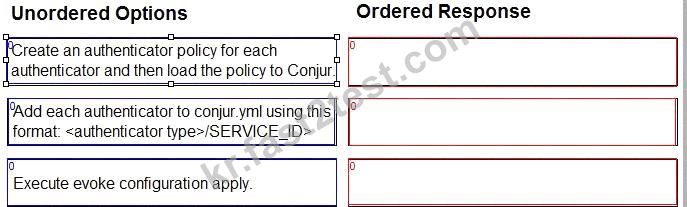
Arrange the steps to configure authenticators in the correct the sequence.
정답:

Explanation

Create an authenticator policy for each authenticator and then load the policy to Conjur.
Add each authenticator to conjur.yml using this format: <authenticator type> <SERVICE_ID>.
Execute evoke configuration apply.
Comprehensive Explanation: Authenticators are plugins that enable Conjur to authenticate requests from different types of clients, such as Kubernetes, Azure, or LDAP. To configure authenticators, you need to follow these steps:
Create an authenticator policy for each authenticator and then load the policy to Conjur. This step defines the authenticator as a resource in Conjur and grants permissions to the users or hosts that can use it. You can use the policy templates provided by Conjur for each authenticator type, or create your own custom policy. For more information, see Define Authenticator Policy.
Add each authenticator to conjur.yml using this format: <authenticator type> <SERVICE_ID>. This step enables the authenticator service on the Conjur server and specifies the service ID that identifies the authenticator instance. The service ID must match the one used in the policy. For more information, see Enable Authenticators.
Execute evoke configuration apply. This step applies the changes made to the conjur.yml file and restarts the Conjur service. This is necessary for the authenticator configuration to take effect. For more information, see Apply Configuration Changes.
References: The steps to configure authenticators are explained in detail in the Configure Authenticators section of the CyberArk Conjur Enterprise documentation. The image in the question is taken from the same source.
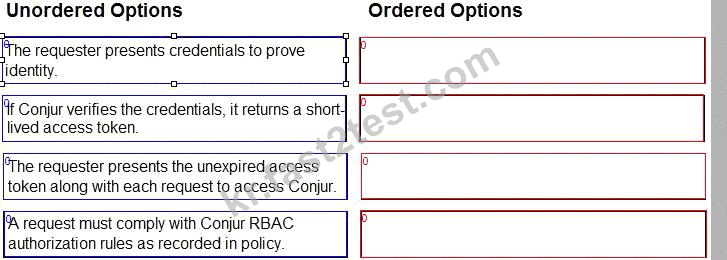
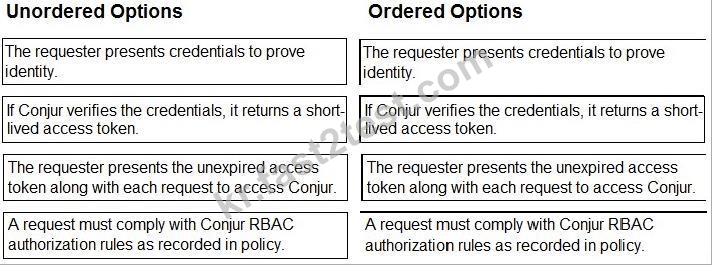
Arrange the steps of a Conjur authentication flow in the correct sequence.
정답:

Explanation
References:
CyberArk Sentry Secrets Manager
documentation: https://docs.cyberark.com/Portal/Content/Resources/_TopNav/cc_Portal.htm CyberArk Sentry Secrets Manager course materials: https://training.cyberark.com/learn CyberArk whitepapers and technical resources: https://www.cyberark.com/resources/home/cyberark-secrets-manager The authentication flow begins with the requester presenting their credentials to Conjur. This can be in the form of a username and password, an API key, or another supported method.
Conjur verifies the presented credentials against its internal database. If the credentials are valid, Conjur generates and returns a short-lived access token to the requester.
The requester includes the access token with every subsequent request to access Conjur resources. This allows Conjur to identify the requester and authorize their access to specific secrets and functionalities based on configured policies.
Finally, each request is evaluated against the Conjur RBAC (Role-Based Access Control) rules defined in its policy. These rules determine which users and roles have access to specific resources and what actions they can perform. Only requests that comply with these rules are granted access.
What does "Line of business (LOB)" represent?
정답: B
설명: (Fast2test 회원만 볼 수 있음)