
Microsoft Designing and Implementing a Server Infrastructure (070-413日本語版) - 070-413日本語무료 덤프문제 풀어보기
DRAG DROP

정답:
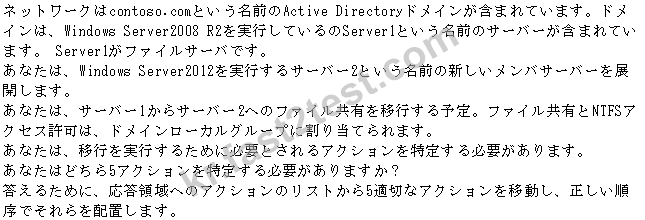
Box 1: On Server2, install the Windows Server Migration Tools.
Box 2: On Server2, create a deployment folder.
Box 3: On Server1, register the Windows Server Migration Tools.
Box 4: On Server2, run the Receive-SmigServerDatacmdlet.
Box 5: On Server1, run the Send-SmigServerDatacmdlet.
Note:
* Windows Server Migration Tools installation and preparation can be divided into the following stages.
1. (box 1) Installing Windows Server Migration Tools on destination servers that run Windows Server
2012.
2. (Box 2) Creating deployment folders on destination servers that run Windows Server 2012, for copying to source servers.
3.Copying deployment folders from destination servers to source servers.
4.(Box 3) Registering Windows Server Migration Tools on source servers.
* Registering Windows Server Migration Tools on source computers
Before you can use a technology's Windows PowerShell snap-in for the first time, it must be registered with Windows PowerShell. You can use SmigDeploy.exe to register the Windows Server Migration Tools snap-in on a migration source computer
* (box 54 Receive-SmigServerData (Receive must be send)
This cmdlet allows a target server to receive shares, folders, files, and associated permissions and share properties that are migrated from a source server. Receive-SmigServerData must be running on the destination server at the same time that the Send-SmigServerDatacmdlet is running on the source server.
* (box 5) Send-SmigServerData (Send must be after receive)
This cmdletmigrates folders, files, and associated permissions and share properties from the local server to a target server. Send-SmigServerData must be run on the source server at the same time that the Receive-SmigServerDatacmdlet is running on the destination server.
Reference: Install, Use, and Remove Windows Server Migration Tools
https://technet.microsoft.com/en-us/library/jj134202.aspx
Box 2: On Server2, create a deployment folder.
Box 3: On Server1, register the Windows Server Migration Tools.
Box 4: On Server2, run the Receive-SmigServerDatacmdlet.
Box 5: On Server1, run the Send-SmigServerDatacmdlet.
Note:
* Windows Server Migration Tools installation and preparation can be divided into the following stages.
1. (box 1) Installing Windows Server Migration Tools on destination servers that run Windows Server
2012.
2. (Box 2) Creating deployment folders on destination servers that run Windows Server 2012, for copying to source servers.
3.Copying deployment folders from destination servers to source servers.
4.(Box 3) Registering Windows Server Migration Tools on source servers.
* Registering Windows Server Migration Tools on source computers
Before you can use a technology's Windows PowerShell snap-in for the first time, it must be registered with Windows PowerShell. You can use SmigDeploy.exe to register the Windows Server Migration Tools snap-in on a migration source computer
* (box 54 Receive-SmigServerData (Receive must be send)
This cmdlet allows a target server to receive shares, folders, files, and associated permissions and share properties that are migrated from a source server. Receive-SmigServerData must be running on the destination server at the same time that the Send-SmigServerDatacmdlet is running on the source server.
* (box 5) Send-SmigServerData (Send must be after receive)
This cmdletmigrates folders, files, and associated permissions and share properties from the local server to a target server. Send-SmigServerData must be run on the source server at the same time that the Receive-SmigServerDatacmdlet is running on the destination server.
Reference: Install, Use, and Remove Windows Server Migration Tools
https://technet.microsoft.com/en-us/library/jj134202.aspx
HOTSPOT


정답:

Explanation:
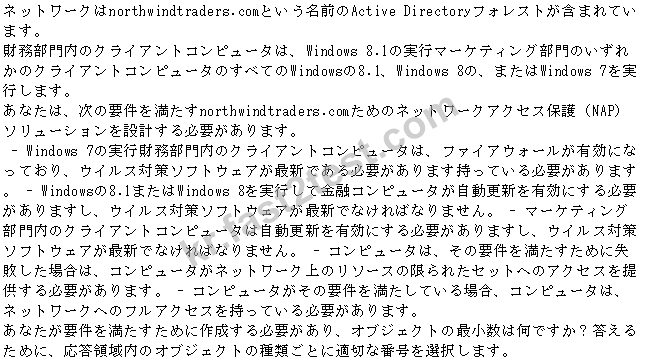
Box 1: Health policies: 3
We need three polices:
1. If it passes anti-virus and Firewall
2. If it passes anti-virus and Updates
3. If it fails antivirus, Updates, or Firewall
Note:
Health policies define which SHVs are evaluated and how they are used in validating the configuration of computers that attempt to connect to your network. Based on the results of SHV checks, health policies classify client health status.
Box 2: Network policies: 4
1. Allow unrestricted access for Finance department if "First health policy" Compliant & (OS version -ge
6.1 & -lt 6.2) (windows 7)
2. Allow unrestricted access for Finance department if "Second health policy" Compliant & OS version - ge 6.2 (windows 8 & 8.1)
3. Allow unrestricted access for Marketing department if "Second health policy" Compliant
4. Else Allow restricted access.
Box 3: System health validator settings: 2
We need two System Health Validator setting:
1. firewall enabled and the antivirus software must be up-to-date (for the Windows 7 clients in finance)
2. automatic updating enabled and the antivirus software must be up-to-date (for the Windows 8.1 or Windows 8 clients in finance, and for clients in marketing) Note: System health validators (SHVs) define configuration requirements for computers that attempt to connect to your network.
The procedure to configure an SHV is unique to each SHV. Configuration choices for the WSHV are shown the following example.

Reference: Configuring NPS system health validators and policies
https://technet.microsoft.com/en-us/library/dd441008.aspx
Reference: Configuring NPS network policies
https://technet.microsoft.com/en-us/library/dd441006.aspx
Topic 2, Parnell Aerospace
Overview
Overview
Parnell Aerospace designs materials and components that are used for commercial airlines.
Parnell has a main office in Dallas and branch offices m Seattle, Atlanta, and New York Parnell has an Active Directory Domain Services (AD DS) domain named parnellaero.com for the Dallas and Manta offices. The forest and Domain functional levels are set to Windows Server 2008.
Domain Controllers
The domain controllers are displayed in the following table:

The Seattle and New York offices have then own child domain named
sales.parnellaero.com. The domain controllers are displayed in the following table.

Parnell also has a number of satellite offices, without domain controllers, that act as both sales and design locations.
Employees have the ability to walk into any office to connect to their respective domain and access the software they need.
All servers in each office run Windows Server 2012 R2 and are 64-bit platforms. Client devices in each office run windows 7 and windows 8.1.
Expansion
Parnell Aerospace is expanding to Great Britain. Parnell creates the domain ukparnellaero.com for the new offices to use.
Parnell creates a new sales office In London,
Parnell also purchases a company in Glasgow named Flight Build that can expand Parnell's research and design diviston. Flight Build has low security and limited bandwidth Flight Build has the domain name flightbuild.com. Flight Build has a single domain controller named FB-DC. Flight Build users use an application that must run on the domain controller Flight Build's server environment contains a server that runs Windows Server 2012 R2 and has Microsoft SQL Server 2012 installed. Ports 12345, 6789, and 10111 have been assigned for System Center Virtual Machine Manager (SCVMM) connections.
The domatn controllers for the two new offices are displayed In the following table:

Business Requirements
Accessing Data Globally
Employees in any office, including satellite and branch offices, must be able to work securely on internal applications, independent of device, and still access all of the information they need.
At times, a large percentage of user's congregate in the same geography to work: on a specific task and environments need to scale quickly to meet the demands.
Application performance
In order to allow multiple simultaneous users to access the design application. The design application is published by using SCVMM Data Conformity All data needs to be synchronized between all offices to ensure that all users have the latest Information available Disaster Preparedness In case of natural disaster, Parnell Aerospace must be able to continue work without disruption Servers In any location must be restored rapidly.
Expansion
The domain flightbuild.com must be renamed to integrate it into the domain uk.parmellaero.com Users in the newly acquired Glasgow office report issues with long logon tunes. Parnell Aerospace must prepare a new domain controller for the logon traffic.
Parnell plans to deploy an additional SCVMM server m the Flight Built environment.
Sales reports
Parnell Aerospace's sales organization uses a large number of slaes reports that are in the Excel format. The reports are very large and accessed often throughout the day. Users report that it takes a long time to open the files, even when they are using the local network.
Technical Requirements
Mixed environment
The existing environment contains Windows servers and legacy UNIX sewers. All UNIX servers run 32-bit operating systems. A Server named UNIX1 is a Fileserver.
Sales reports
Sales reports must be saved on an automated storage tier named Sales Reports. All file servers are equipped with both solld-state drives and standard hard-dusk drives.
Sales Application
A sales application in the parneraero.com domain must be accessible to users outside of the network during sales calls.
The application ls configured by using automatic triggering of VPN connections.
Design Application
A design application must allow automatic logon by using VPN when users in the parnellaero.com domain are working from a location outside of the office. Users report the authentication fails.
UK Division Sales
Sales people in the new UK domain must be able to access a web-based sales application named UKSales that is used ln then geography by using any device including hand-held units, smart phones, and laptop computers.
Active Directory
The Active Directory Recycle Bin must be enabled throughout the forest.
DRAG DROP


정답:
Box 1: Alias (CNAME)
Box 2: Service Location (SRV)
Scenario:
* A line-of-business (LOB) application named App1 is deployed on LA-SVR01 and LA-SVR02.
* App1 uses a DNS application directory partition on LA-DC01 and NY-DC01. App1 uses IPv6 for network connectivity and must resolve single-label names for resources in the woodgrovebank.com DNS zone.
GlobalNames zone has been created, but the zone has not been populated with resource records.
Box 2: Service Location (SRV)
Scenario:
* A line-of-business (LOB) application named App1 is deployed on LA-SVR01 and LA-SVR02.
* App1 uses a DNS application directory partition on LA-DC01 and NY-DC01. App1 uses IPv6 for network connectivity and must resolve single-label names for resources in the woodgrovebank.com DNS zone.
GlobalNames zone has been created, but the zone has not been populated with resource records.
정답: A
DRAG DROP


정답:
Create a parity virtual disk.
Create a simple volume.
Create and attach a VHD.
Create a storage pool.
Create a simple volume.
Create and attach a VHD.
Create a storage pool.
HOTSPOT


정답:

정답: B
설명: (Fast2test 회원만 볼 수 있음)
정답: A
설명: (Fast2test 회원만 볼 수 있음)
HOTSPOT

PS C:\> Get-DnsServerScavenging
NoRefreshInterval:2.00:00:00
RefreshInterval:3.00:00:00
ScavengingInterval:4.00:00:00
ScavengingState:True
LastScavengeTime:1/30/2014 9:10:36 AM



PS C:\> Get-DnsServerScavenging
NoRefreshInterval:2.00:00:00
RefreshInterval:3.00:00:00
ScavengingInterval:4.00:00:00
ScavengingState:True
LastScavengeTime:1/30/2014 9:10:36 AM
정답:

First answer
* -NoRefreshInterval<TimeSpan>
Specifies a length of time as a TimeSpan object. NoRefreshInterval sets a period of time in which no refreshes are accepted for dynamically updated records. Zones on the server inherit this value automatically.
This value is the interval between the last update of a timestamp for a record and the earliest time when the timestamp can be refreshed. The minimum value is 0. The maximum value is 8760 hours (seven days).
* Here it is set to 2 days: NoRefreshInterval:2.00:00:00
Second answer
-ScavengingState<Boolean> (In this question it is set to true)
Enables or disables automatic scavenging of stale records. ScavengingState determines whether the DNS scavenging feature is enabled by default on newly created zones. The acceptable values for this parameter are:
-- $False. Disables scavenging. This is the default setting.
-- $True. Enables scavenging